Denon DJでは、製品を最新のオペレーティングシステムに完全対応させることが重要であると認識しています。そのため、現在、当社のソフトウェアおよびハードウェア製品が macOS 27 Golden Gate に完全対応しているかを確認するための体系的なテストを実施しています。
Golden Gate のベータ版はすでに公開されていますが、最終的にはmacOS 27の正式リリース版との完全な互換性を確保する必要があります。ユーザーの皆様に円滑な使用体験を提供できるよう、現在、製品のテストと最適化に鋭意取り組んでいます。
macOS 27 Golden Gate 対応ハードウェア
macOS Golden Gateに関するすべての互換性テストは、IntelプロセッサおよびAppleシリコン(ベースモデル)を搭載した環境で実施されています。
製品 | Apple Silicon |
|---|---|
| DS1* | 対応 |
LC6000 | 対応 |
MC4000* | 対応 |
| MC6000 MKII* | 対応 |
MCX8000*** | 対応 |
PRIME 2 | Supported** |
PRIME 4 | 対応 |
PRIME 4 + | 対応 |
| Prime 4 G2 | 対応 |
PRIME GO | Supported** |
PRIME GO + | Supported** |
SC Live 2 | 対応 |
SC Live 4 | 対応 |
SC5000 | 対応 |
SC5000M | 対応 |
SC6000 | 対応 |
SC6000M | 対応 |
X1800 | Supported* |
X1850 |
* The product may have passed testing showing support for connection and MIDI communication, but firmware update software or other utilities may not have been tested or are found to be not supported.
** The PRIME GO/+ and PRIME 2 are fully standalone products that do not require macOS 27 Golden Gate or Apple Silicon support for normal use. Operations such as updating firmware and transferring files have passed testing for macOS 26 and Apple Silicon support.
*** The Mac driver v.1.0.3 is only for Catalina - not needed for Golden Gate
macOS 27 Golden Gate 対応ソフトウェア
Engine DJ
The Engine DJ software is a crucial part of the Denon DJ hardware ecosystem and many of the units rely on this software for key functionality.
Our Engine hardware product owners will be happy to know the Engine DJ Desktop software is fully supported for use on macOS 27 Golden Gate, both Apple Silicon and Intel processors, as of Engine DJ version 5.3.0 For more details and required system specs, please visit the Engine DJ Downloads page:
If you have any questions or concerns about the compatibility of our products with macOS 27 Golden Gate, please do not hesitate to contact our customer support team for assistance. We are here to help and are committed to providing the best possible experience for our customers.
Software Partners
Many of our products are dependent on software for all functionality and control while the device is connected to a computer. Our products may be considered "supported" for an operating system, but will not be functional until software support is also available. So, It is crucial that you weigh software compatibility before choosing to update your system.
Please check with the developers for your preferred software titles for the latest in compatibility before choosing to update. We've listed a few key titles below for your convenience.
| Software | macOS 27 Golden Gate Support |
|---|---|
| Serato DJ Pro | TBD |
| Serato DJ Lite | TBD |
| Algoriddim djay Pro | TBD |
システムの自動アップデートを防ぐには?
オペレーティングシステムの自動アップデート機能が有効になっていないか、必ずご確認ください。自動アップデートは便利な機能である一方、ソフトウェアツールの安定性を重視するユーザーにとっては、システムにインストールするOSを自身で管理・選択できる状態にしておくことが望ましいと言えます。
自動アップデート機能は、実行前にソフトウェアの互換性を確認しません。そのため、使用している機材やソフトウェアがOSの変更に対応していない場合、安定性やその他の機能に問題が生じる可能性があります。
トラブルやダウンタイムを避けるため、アップデートを行う際は慎重に判断し、事前にすべてのソフトウェアツールに互換性があるかを確認することをお勧めします。macOSの自動アップデートを無効にするには、以下の手順を行ってください:
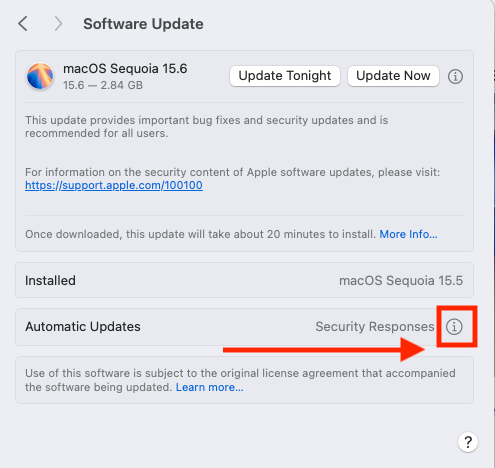
- 「システム設定」>「一般」>「ソフトウェアアップデート」に移動します。
- 「自動アップデート」の横にある情報(i)アイコンをクリックします。
- 以下のすべてのチェックボックスのチェックを外します。
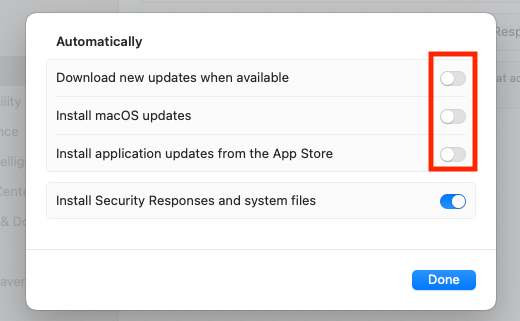
- 「完了」をクリックして変更を適用します。
この記事は役に立ちましたか?
それは素晴らしい!
フィードバックありがとうございます
お役に立てず申し訳ございません!
フィードバックありがとうございます
フィードバックを送信しました
記事の改善におけるご協力ありがとうございます。