MPC Standalone | Exporting A Group Of Tracks As Their Own Separate Mixdown
When working on a project, there may be times when you want to export only a specific group of tracks instead of the entire mix. For example, you might be working on a project with a full band but only want to export the guitars, bass, and vocals as a single audio file so the drummer can use it as a backing track.
In this article, we will be using a submix, which allows multiple selected tracks to be routed and combined into a single track and exported together. Please follow the steps below to get started.
1. Open your project, press the Menu button, and select Channel Mixer.
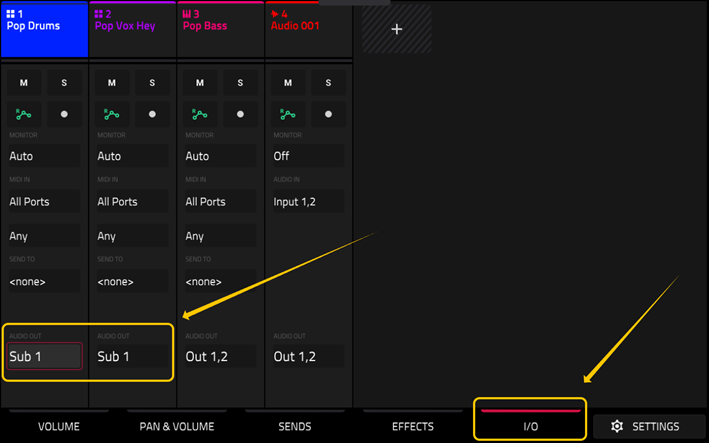
2. Tap the I/O tab at the bottom of the screen.
3. For the tracks you want to isolate, double-tap the Audio Out field and select Sub 1. In the example below, this output has been assigned to the Pop Drums and Pop Vox Hey tracks.
4. Once set, press the Menu button > Save > Audio Mixdown.
5. In the Audio Mixdown window, enable the Stereo Output option, then double tap its dropdown menu and select Submix 1.
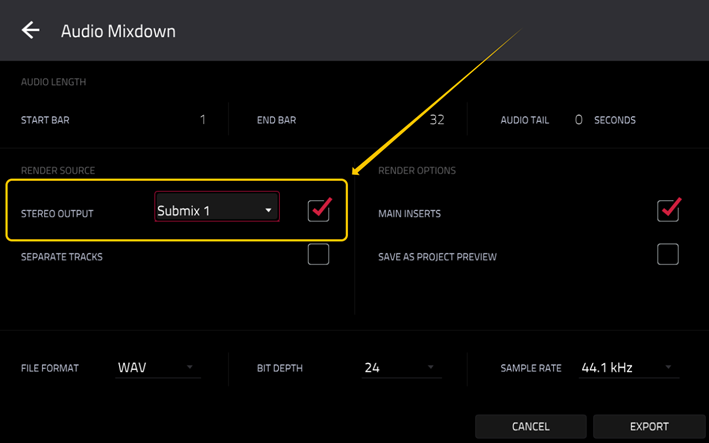
6. Tap EXPORT, choose a location to save the file, and the tracks from step 3 which were assigned to Sub 1 will be exported together as a single audio file, ready for sharing.
Was this article helpful?
That’s Great!
Thank you for your feedback
Sorry! We couldn't be helpful
Thank you for your feedback
Feedback sent
We appreciate your effort and will try to fix the article