
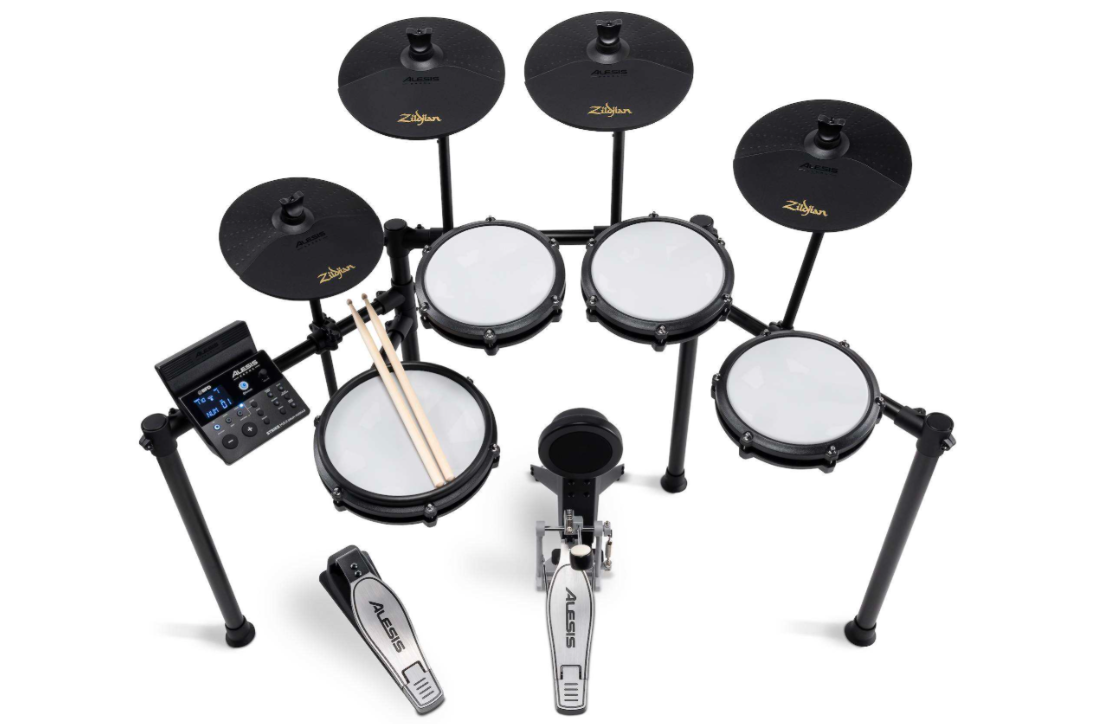
Is the Strike Max the same as the Strike Pro?
Despite the naming similarities, the Strike Max is not intended as a replacement for the Strike Pro kits or module as it is it's own exclusive entry powered by Alesis, BFD, and Zildjian® Cymbals.
What is included with the Strike Max Kit?
The Alesis Strike Max Kit includes everything you need to make a complete drum kit:
In the box:
- Strike Max drum module
- 10" Dual-Zone mesh Snare
- (3) 8" mesh toms
- (2) 10" Crash cymbal pads
- 10" Ride cymbal pad
- 10" Hi-hat cymbal pad
- Hi-hat pedal
- 6" Kick drum pad
- Kick pedal
- 4-post professional metal rack
- Cable snake
- 6' 1/4" TRS to TRS connection cable Cable wrap strips
- Drum key
- Drumsticks
- Power supply
- Module quickstart guide
- Kit assembly guide
- Box contents booklet
- Drumeo drum lessons card
- Allen wrench
- Safety & warranty manual
Via download:
- BFD Player
- BFD Player Core Expansion Pack
- BFD Player Zildjian® Session Mix Vol. 1 Expansion Pack
- BFD Player Dark Mahogany Expansion Pack
What software comes with the Strike Max Kit?
Strike Max users can learn how to play drums along with Drumeo, while those looking to peruse a larger catalog of digital sounds can use the BFD Player for even more professional-level sounds.
Can I expand this kit with more drum triggers?
Yes! An additional tom can be added to the Strike Max drum module with the Tom 4 input on the rear of the module.
What is the size of the kit when it is fully assembled?
The size of the completed kit will be around 4' x 3'. As with all of our kits, the arrangement is fully customizable and the exact size can vary with different playing styles and personal preferences.
Can I use my own pads with the Strike Max module?
While other standard or dual-zone single pads will likely work, the Strike Max module is configured to respond optimally with the included drum kit. You could potentially use third-party standard triggers, however, since other manufacturers design triggers specifically for different drum modules, not all triggers may respond as expected.
Is there a recommended type of drumstick I should use with mesh pads?
Although some companies make sticks specifically marketed toward mesh drum heads, it is not necessary to use a specific style of drumstick with mesh heads. Any wooden or plastic tipped drumstick will not damage the drum head. Unlike acoustic drums, the style of the stick will not affect the sound produced.
If you would like to use a set of drumsticks other than those supplied with the kit, we recommend using a new set of sticks that have not been chipped, worn down, or otherwise damaged from playing an acoustic drum kit. The irregularities on a damaged drumstick can pull at the material on the mesh drum heads and cause it to deteriorate which over time may puncture the head.
Avoid using felt beaters or mallets. The friction caused by the felt can wear the mesh over time.
Is the Hi-Hat pedal a continuous or a switch-type pedal?
The Hi-Hat pedal included with the Strike Max Kit is a continuous variable type pedal. This pedal allows for open, half-open, and closed hi-hat sounds, and will also allow for "chick" and "splash" sounds when the pedal is pressed down and released without striking the hi-hat cymbal pad.
What sample content is included with the Strike Max module?
The Strike Max module comes complete with 48 BFD, classic and modern ready-to-play kits. These kits and their component drums can be mixed and matched for maximum flexibility! The USB/MIDI connection allows MIDI information to be transferred between the module and the computer, so while it will not allow for audio file upload or transfer, it will allow for the module to send MIDI information to the computer to trigger your favorite DAW or virtual instrument. The Bluetooth functionality will allow you to stream music into your Strike Max Module so you can play along effortlessly!
What features will help me learn drums?
The Strike Max includes 90-days of unlimited drum lessons from Drumeo. Drumeo is today's top drum education software with interactive lessons to help you learn, practice, and progress faster. The Strike Max module features three different learning modes for developing your skills and becoming a better drummer. Start by pressing the Mode button until the LED next to the bottom row of text is lit, and then choose from one of three learning mode buttons:
- Beat (BEA) - This mode is for the snare pad only and helps develop timing, meter, and basic patterns.
- Rhythm (RHM) - Rhythm mode expands the learning environment to the entire kit and helps develop coordination and timing with the entire kit.
- Pattern (PTN) - This mode adds backing tracks for practice playing with accompanying instruments.
Choose a pattern using the - and + buttons and press Start/Stop to begin. The pattern will count off and then repeat for you to follow along.
To help with the learning process, every practice is recorded and scored by default. If you wish to practice without being scored, use the Play/Practice button to begin the sequence.
Can I play along with songs on my phone/tablet/computer?
Yes, the Strike Max module features Bluetooth connectivity in addition to an 1/8" (6.35mm) Aux input to allow you to connect a phone or other device for playback. To balance the levels, use the Volume knob on the Strike Max module and the volume controls on your device.
How do I connect my device via Bluetooth?
- Press and release the Power button to power on the Strike Max drum module. When no Bluetooth device is connected, the Bluetooth button LED will be off.
- Press the Bluetooth button to enter pairing mode. The Bluetooth button LED will flash.
- Navigate to your device’s Bluetooth settings and select Alesis Strike Max. Once your device has been paired, the Bluetooth button LED will be fully lit.
Note: If the Bluetooth button is pressed again, pairing mode will be canceled, and the LED will return to the previous state (paired with the previous device or no device).
To disconnect a paired device, press and hold the Bluetooth button again.
Can the Strike Max drum module connect to a computer to trigger drum software?
Yes, and we've included BFD Player and (3) Expansion Packs for using your Strike Max Kit with your computer.
BFD Player is a powerful drum software companion that expands beyond the Strike Max module, giving you even more hi-fi sounds on your computer-just connect via USB
To connect to your PC there is a USB/MIDI connection for use with BFD Player, virtual instruments and recording software. The Strike Max is class-compliant, which means that it will work with any modern Mac or PC without the need to download any software or drivers.
How do I adjust the volume of each individual pad?
- Make sure the module is in Normal mode (top Mode LED is lit).
- Hit the pad whose settings you want to adjust.
- Press the Voice button.
- Press – / + buttons to change a sound.
- Press the Voice button again to view and edit these settings on the display: VOL: Pad volume.
- Use the – and + buttons to adjust the value.
To Save your settings:
- Press Save.
- Use the – and + buttons to select the User Kit slot you want to save it to (33 - 48).
- Press Save again.
Can I reset the module to its factory default settings?
Yes. Hold the + and - buttons simultaneously while powering on the unit. The screen will show "RST---" for one second and then the module will restore back to the factory default settings and be ready to use.
My headphones have a built-in microphone. Can I use these with my module?
Headphones that feature a built-in microphone have a 'TRRS jack' that may not work properly with the Strike Max module. The TRRS headphone jack features an extra channel which may prevent it from lining up properly inside the headphone port on the module which can cause audio drop-outs or incomplete signals. Standard headphones which feature a 'TRS' headphone jack are required for a consistent and reliable connection.
Can I fold this kit away for storage or travel?
Absolutely! If the crossbars connected to the two center posts are loosened, the kit can be "folded" to make it easier for travel. When folded, the dimensions are around 36” x 23” x 12”. (Height x Width x Depth). This estimate is based on lowering the drums as much as possible and pushing the rack together.
Should I set up the Strike Max Kit on a rug?
A rug is not technically required, however, most drummers will use one by default in order to prevent the kick, pedals, or entire kit from shifting during play. When using any drum kit on a bare floor, the force of playing can cause some pieces to move (usually the kick pedal and pad). Arranging the kit on a rug or carpet is a regular solution to this.
Was this article helpful?
That’s Great!
Thank you for your feedback
Sorry! We couldn't be helpful
Thank you for your feedback
Feedback sent
We appreciate your effort and will try to fix the article