It's important to keep your Prime's firmware up-to-date to make sure you aren't missing out on new features & content. In this video, you'll learn how to check for firmware updates for your board, and the two methods you can use to update it.
0:00 Intro
0:17 How to check for firmware updates
1:15 Methods for updating the firmware
1:34 Method 1: updating via Wi-Fi
2:33 Method 2: updating via USB cable & Firmware Updater
3:55 Further support
Manual Update Mode
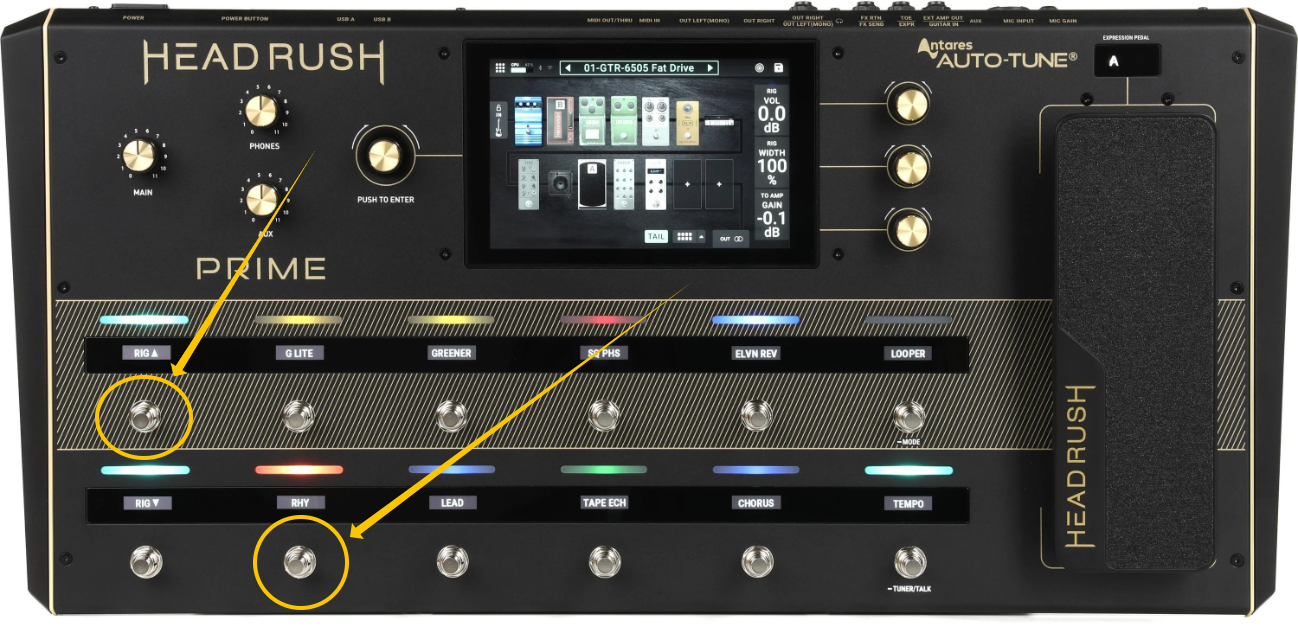
If you are having trouble getting the Prime into Update Mode or are unable to reach the Prime settings, you can power the Prime off and power it back on using a button combination to boot it straight into Update Mode.
First, prepare your update as shown in the video above. Once ready, power off the Prime. Then, press and hold footswitches 1 and 8 while powering the unit on to boot directly into Update Mode.
Was this article helpful?
That’s Great!
Thank you for your feedback
Sorry! We couldn't be helpful
Thank you for your feedback
Feedback sent
We appreciate your effort and will try to fix the article