
In this article, we will walk you through the process of adjusting the crossfader and channel fader tension on your RANE SYSTEM ONE. This simple procedure can help you tailor the feel and responsiveness of your faders to better match your mixing style and preferences.
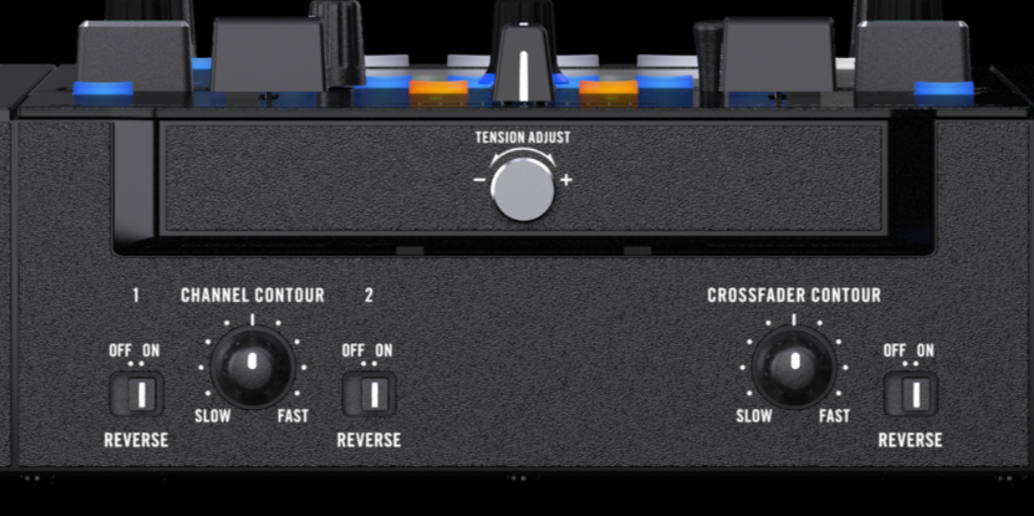
To adjust the crossfader tension on your RANE SYSTEM ONE, rotate the Tension Adjust knob to the left to decrease tension or to the right to increase tension.
Crossfader Contour - Adjusts the slope of the crossfader curve. Turn the knob to the left for a slow smooth fade (mixing) or to the right for a fast sharp cut (scratching). The center position is a typical setting for club performances.
To adjust the channel fader tension on your Rane SYSTEM ONE, follow these steps:
- Start by powering off your SYSTEM ONE to ensure safety during the adjustment process.
- Remove the caps from the channel faders, and crossfader.
- Use a Phillips head screwdriver to remove the screws and then remove the front faceplate surrounding the faders. Be sure to keep track of the fader caps and faceplate screws. We recommend using a small plastic bag, or a cup.
- Locate the tension adjustment screw on each of the fader - Use a small screwdriver to turn the adjustment screw clockwise to increase the tension or counterclockwise to reduce the tension.
- Evaluate the crossfader tension by maneuvering it back and forth to test the resistance. Continue to adjust the tension until you achieve the preferred feel and response that aligns with your mixing style.
- Reinstall the mixer faceplate, screws, and fader caps.
Channel Contour - Adjusts the slope of the Channel 1 and 2 fader curves:
- Logarithmic Curve : Turning the knob to the left increases the volume sharply near the top of the channel fader’s range, allowing for finer control at lower levels.
- Linear Curve : Placing the knob in the center position increases volume evenly as the channel fader is moved upward, providing a consistent response throughout.
- Exponential Curve : Turning the knob to the right increases the volume rapidly from the bottom of the channel fader’s range, ideal for quick transitions or cutting effects.
Channel/Crossfader Reverse - These switches reverse the direction of the Channel faders and the Crossfader when set to ON. Set to OFF to use the conventional fader direction.
By following these simple steps, you can easily customize the fader tension on your Rane System One to better match your preferences and improve your overall mixing experience.
If you require further assistance, please open a support ticket.
Was this article helpful?
That’s Great!
Thank you for your feedback
Sorry! We couldn't be helpful
Thank you for your feedback
Feedback sent
We appreciate your effort and will try to fix the article