How to set up your free Komplete Select bundle for 3rd party controllers
Native Instruments has introduced initial NKS compatibility for a variety of keyboard brands. More brands and keyboards will be added in the future.
If you use one of the supported controllers, you'll get a free Komplete 15 Select bundle.
Please select a brand to find the eligible controllers and how to set up your Komplete Select bundle:
TABLE OF CONTENTS
Akai Pro
The following Akai Pro keyboards allow you to register a free version of Komplete Select:
- MPK225/249/261
- MPK Mini MK3
- MPK Mini Play
- MPK Mini Plus
Here's how to set it up:
Receive voucher code from Akai Pro
If you haven't received a voucher code for your Komplete Select 'Akai Pro MPK Edition' yet, please follow the steps:
- Create an account at inMusic / Akai Pro and register your product.
- Download and install the inMusic Software Center and log in.
- Click the Offers tab.
- Find your Komplete Select offer and click Get Code to receive your voucher code.
Redeem voucher code
- Choose your Komplete Select version on this page.
- In the Shopping Cart, click Add a voucher, add the voucher code and click Redeem.
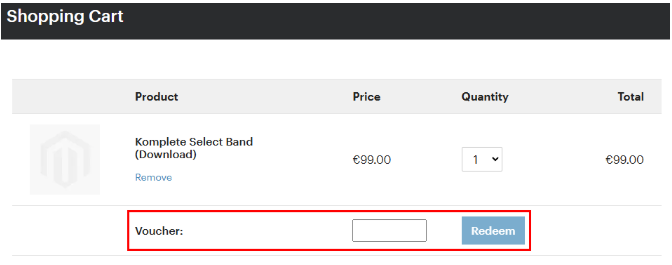
- Continue with the checkout.
Install software
- Download and install Native Access and log in.
- If the products included with your Komplete Select version are not displayed, click the refresh button. Please also make sure that you are logged in with the correct email address.

- Install Komplete Kontrol software to set up your controller. The integration requires Komplete Kontrol 3.4 (or higher) and at least macOS 13 / Windows 10.
- Install Kontakt Player. This is required for many instruments.
- Install the Komplete Select products and instruments you want to use.
Further resources
You can find further setup instructions and mappings in the Komplete Kontrol manual.
Arturia
The following Arturia keyboards allow you to register a free version of Komplete Select:
- Arturia KeyLab mk3
- KeyLab Essential mk3
- MiniLab mk3
Here's how to set it up:
Receive voucher code from Arturia
If you haven't received a voucher code for your Komplete Select version yet, please follow the steps:
- Create an account at Arturia and register your product.
- Open the My Products area in your Arturia account.
- Click See more.
- Find your Komplete Select serial under Other Included Licenses. This serial is your voucher code for the next step.
Redeem voucher code
- Choose your Komplete Select version on this page.
- In the Shopping Cart, click Add a voucher, add the voucher code and click Redeem.
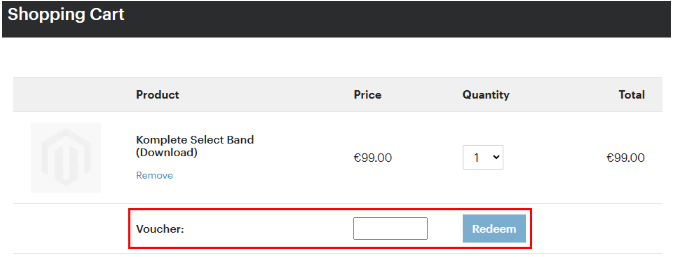
- Continue with the checkout.
Install software
- Download and install Native Access and log in.
- If the products included with your Komplete Select version are not displayed, click the refresh button. Please also make sure that you are logged in with the correct email address.

- Install Komplete Kontrol software to set up your controller. The integration requires Komplete Kontrol 3.4 (or higher) and at least macOS 13 / Windows 10.
- Install Kontakt Player. This is required for many instruments.
- Install the Komplete Select products and instruments you want to use.
You can find further setup instructions and mappings in the Komplete Kontrol manual.
KORG
The following KORG keyboards allow you to register a free version of Komplete Select:
- KORG Keystage 49/61
Here's how to set it up:
Receive voucher code from KORG
If you haven't received a voucher code for your Komplete Select version yet, please follow the steps:
- Go to the KORG License Center.
- Enter the code from the “License Card” included with your KORG Controller.
- Find Komplete Select and copy the voucher code.
Redeem voucher code
- Choose your Komplete Select version on this page.
- In the Shopping Cart, click Add a voucher, add the voucher code and click Redeem.
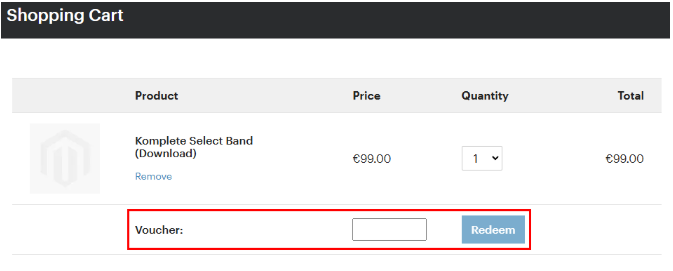
- Continue with the checkout.
Install software
- Download and install Native Access and log in.
- If the products included with your Komplete Select version are not displayed, click the refresh button. Please also make sure that you are logged in with the correct email address.

- Install Komplete Kontrol software to set up your controller. The integration requires Komplete Kontrol 3.4 (or higher) and at least macOS 13 / Windows 10.
- Install Kontakt Player. This is required for many instruments.
- Install the Komplete Select products and instruments you want to use.
You can find further setup instructions and mappings in the Komplete Kontrol manual.
M-Audio
The following M-Audio keyboards allow you to register a free version of Komplete Select:
- Hammer 88 Pro
- Oxygen 49/61 MKV
- Oxygen Pro 25
- Oxygen Pro 49/61
- Oxygen Pro Mini
Here's how to set it up:
Receive voucher code from M-Audio
If you haven't received a voucher code for your Komplete Select version yet, please follow the steps:
- Create an account at inMusic / M-Audio and register your product.
- Download and install the inMusic Software Center and log in.
- Click the Offers tab.
- Find your Komplete Select offer and click Get Code to receive your voucher code.
Redeem voucher code
- Choose your Komplete Select version on this page.
- In the Shopping Cart, click Add a voucher, add the voucher code and click Redeem.
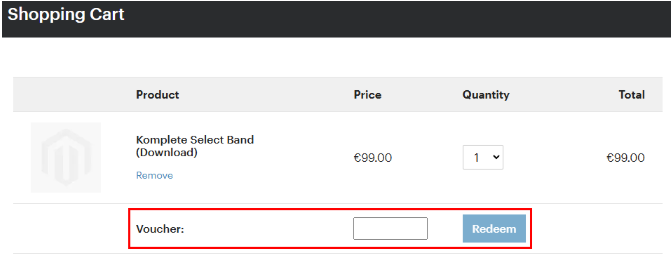
- Continue with the checkout.
Install software
- Download and install Native Access and log in.
- If the products included with your Komplete Select version are not displayed, click the refresh button. Please also make sure that you are logged in with the correct email address.

- Install Komplete Kontrol software to set up your controller. The integration requires Komplete Kontrol 3.4 (or higher) and at least macOS 13 / Windows 10.
- Install Kontakt Player. This is required for many instruments.
- Install the Komplete Select products and instruments you want to use.
Further resources
You can find further setup instructions and mappings in the Komplete Kontrol manual.
Nektar
The following Nektar keyboards allow you to register a free version of Komplete Select:
- Impact LX25+
- Impact LX49+
- Impact LX61+
Here's how to set it up:
Receive voucher code from Nektar
If you haven't received a voucher code for your Komplete Select version yet, please contact Nektar support here: Nektar support
Redeem voucher code
- Choose your Komplete Select version on this page.
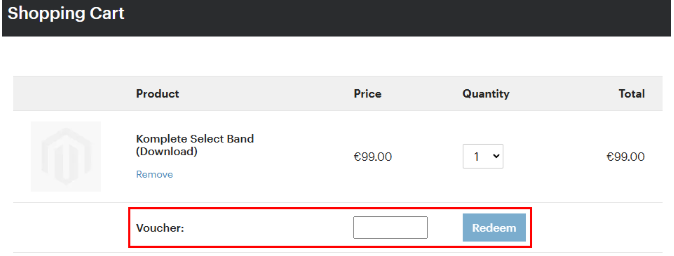
- In the Shopping Cart, click Add a voucher, add the voucher code and click Redeem.
- Continue with the checkout.
Install software
- Download and install Native Access and log in.
- If the products included with your Komplete Select version are not displayed, click the refresh button. Please also make sure that you are logged in with the correct email address.

- Install Komplete Kontrol software to set up your controller. The integration requires Komplete Kontrol 3.4 (or higher) and at least macOS 13 / Windows 10.
- Install Kontakt Player. This is required for many instruments.
- Install the Komplete Select products and instruments you want to use.
You can find further setup instructions and mappings in the Komplete Kontrol manual.
Novation
The following Novation keyboards allow you to register a free version of Komplete Select:
- Novation 49/61SL MKIII
- FLkey Mini/37/49/61
- Launchkey Mini MK3
- Launchkey Mini 25/37 MK4
- Launchkey 25/37/49/61/88 MK3
- Launchkey 25/37/49/61 MK4
Here's how to set it up:
Receive voucher code from Novation
If you haven't received a voucher code for your Komplete Select version yet, please follow the steps:
- Register your product at Focusrite Group.
- Click the My Software tab.
- Find your Komplete Select offer and copy the voucher code.
Redeem voucher code
- Choose your Komplete Select version on this page.
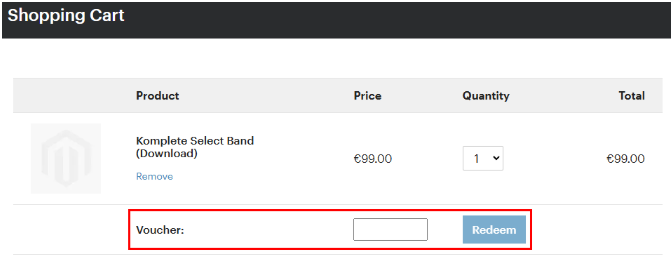
- In the Shopping Cart, click Add a voucher, add the voucher code and click Redeem.
- Continue with the checkout.
Install software
- Download and install Native Access and log in.
- If the products included with your Komplete Select version are not displayed, click the refresh button. Please also make sure that you are logged in with the correct email address.

- Install Komplete Kontrol software to set up your controller. The integration requires Komplete Kontrol 3.4 (or higher) and at least macOS 13 / Windows 10.
- Install Kontakt Player. This is required for many instruments.
- Install the Komplete Select products and instruments you want to use.
Further resources
You can find further setup instructions and mappings in the Komplete Kontrol manual.
Was this article helpful?
That’s Great!
Thank you for your feedback
Sorry! We couldn't be helpful
Thank you for your feedback
Feedback sent
We appreciate your effort and will try to fix the article