My Arturia Plug-ins Are Missing in the Komplete Kontrol / Maschine Browser
Symptom:
Although the Arturia plug-ins are installed and listed in Komplete Kontrol / Maschine under Preferences > Plug-ins, the products are not displayed in the Komplete Kontrol / Maschine browser.
Cause:
It is likely that the NKS resources haven't been installed in the Arturia Software Center.
Solution:
Reinstall the Arturia plug-ins including all 3rd party resources:
- Close all audio applications.
- Start Arturia Software Center and log in.
- Open Preferences > Advanced.
- Uncheck the option Silent install and download size optimization.
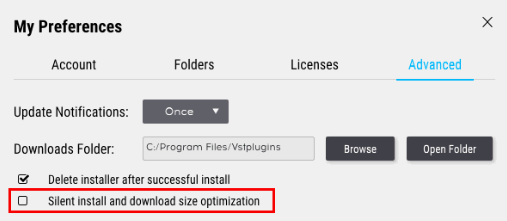
- Uninstall the affected plug-ins from the My Products tab.
- Start the installation of one of the plug-ins. Make sure to activate the option ThirdParty Resources during the process. Also check whether you have ticked all the plug-in formats you want to install:
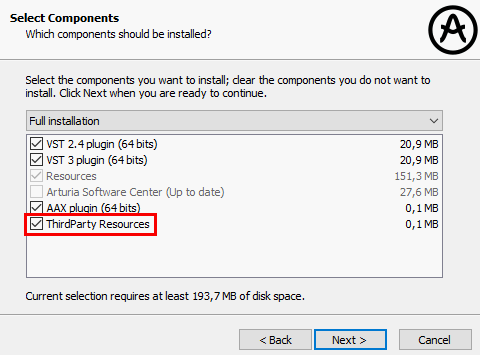
- After the installation, you can reactivate the Silent Install option in the Preferences again and install the rest of your plug-ins.
If the issue persists, please follow the steps in these articles:
Was this article helpful?
That’s Great!
Thank you for your feedback
Sorry! We couldn't be helpful
Thank you for your feedback
Feedback sent
We appreciate your effort and will try to fix the article