KOMPLETE KONTROL / MASCHINE Error: Product Could Not Be Loaded (Apple Silicon / VST3)
If you receive a “Product could not be loaded” error in KOMPLETE KONTROL or MASCHINE, it is typically related to Apple Silicon compatibility or unsupported VST2 plug-ins.
Loading Issue
*Product* could not be loaded, as it may not support Apple Silicon or VST2 to VST3 migration.
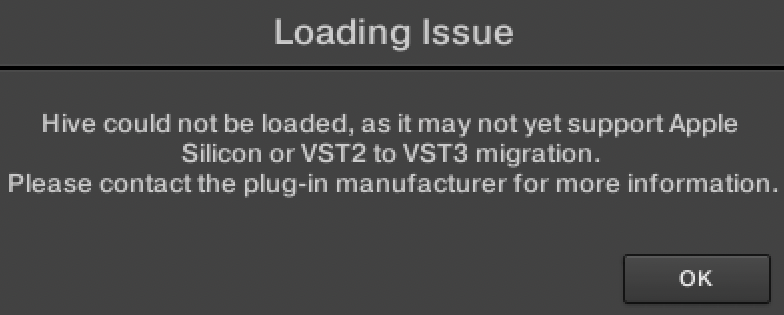
This error can occur when loading plug-ins that are not compatible with the current system requirements.
TABLE OF CONTENTS
Common causes:
End of VST2 Support on Apple Silicon / M1 Series Computers
On Apple Silicon / M1 series processors, KOMPLETE KONTROL 2.8 / MASCHINE 2.16 (and higher) have dropped VST2 plug-in support.
This means that VST2 plug-ins will no longer load in KOMPLETE KONTROL 2.8 / MASCHINE 2.16 (and higher) on Apple Silicon / M1 series systems.
NI Products Native Compatibility with Apple Silicon
While some NI VST products are already available in VST3 format, only the ones updated to full native compatibility with Apple Silicon will load in KOMPLETE KONTROL 2.8 / MASCHINE 2.16 (and higher).
Intel systems are not affected
VST2 plug-ins are still supported on Intel-based Mac systems
Workaround: Use Rosetta Mode
Launch KOMPLETE KONTROL / MASCHINE 2 in Rosetta Mode
Apple silicon-based computers include a feature called Rosetta. This allows Intel-based apps to run on Apple silicon processors. Follow these steps to launch KOMPLETE KONTROL or MASCHINE in Rosetta mode.
Important note: Apply these steps to your DAW if using KOMPLETE KONTROL / MASCHINE as a plug-in.
- Make sure KOMPLETE KONTROL / MASCHINE and all audio / MIDI software are closed.
- In Finder, go to Macintosh HD > Applications > Native Instruments and locate the Komplete Kontrol or Maschine 2 folder.
- Right-click the app icon and select Get Info from the menu.
- Tick the box: Open using Rosetta:
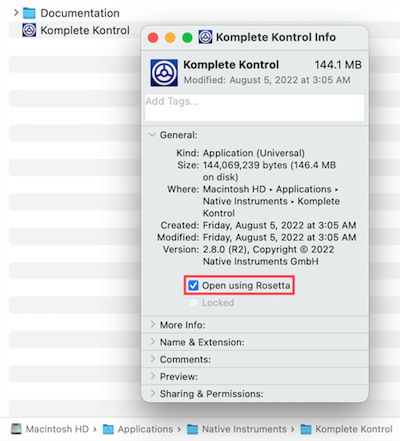
Now KOMPLETE KONTROL / MASCHINE will open in Rosetta compatibility mode. All current NI products will open as expected. This also applies to 3rd-party plug-ins that are only available in VST2 format and / or aren't compatible with Apple Silicon / M1 processors.
Was this article helpful?
That’s Great!
Thank you for your feedback
Sorry! We couldn't be helpful
Thank you for your feedback
Feedback sent
We appreciate your effort and will try to fix the article