Maschine / Komplete Kontrol Error Message: "Another scan is currently in progress."
Symptom
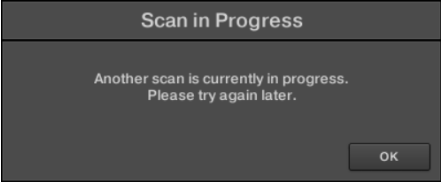
When loading the Maschine 2 / Komplete Kontrol software, you get the following error message:
Another scan is currently in progress. Please try again later.
Cause
The cause of the issue is not currently clear. Our developers are currently investigating. Thank you for your patience.
Solutions
The following solutions have helped most users to solve the issue:
Install the latest Windows Updates
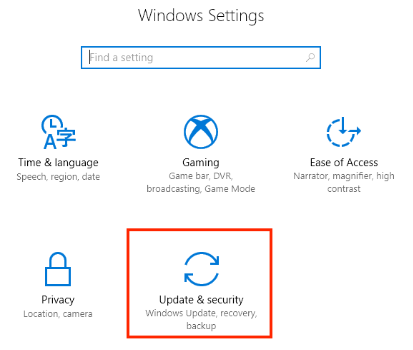
- Press the Windows key + 'I' in order to open the Windows Settings and choose the Update & security option:
- Open the Windows Update tab and click Check for updates:
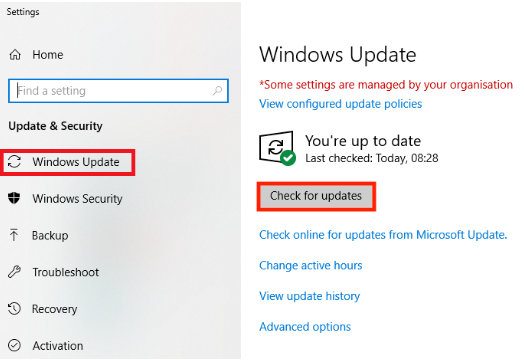
- Install all available Windows Updates.
Disable the User Account Control (UAC)
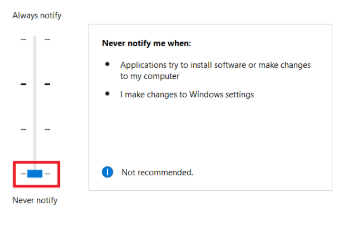
- Click the Windows Start button and type UAC.
- Click Change User Account Control settings in the search results.
- Then drag the slider down to Never notify and click OK.
- Restart your computer so that the changes are implemented.
Administrator Mode
Depending on your Windows system setup, it may be necessary to open the Maschine / Komplete Kontrol application in Administrator mode. To do this:
- Right-click the Maschine / Komplete Kontrol application icon on your desktop (or the .exe file in the Program Files folder).
- Choose Properties.
- On the Compatibility tab, select the Run This Program As An Administrator option.
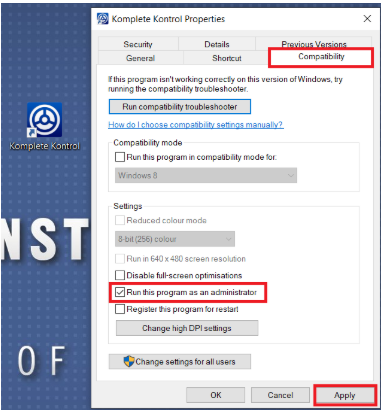
- Click Apply and then OK to confirm.
Maschine / Komplete Kontrol will now always run in Administrator mode.
Windows Account Name
The "Another Scan is currently in progress" error may occur if the name of your Windows account contains multi-byte characters (like Hanzi, Kanji, Hindu, Thai, Cyrillic characters, German umlauts (ä, ü, ß), French accents, etc.
- Create a new Windows Administrator - Local Account ensuring that the account name contains only alphanumerical characters (A - Z, 1 - 9). This video from Microsoft shows you how to do this.
- Switch to that new account.
Please note that changing the name of an existing account won’t work. It must also be a Local account, not a Microsoft account.
Now you should be able to load Maschine / Komplete Kontrol successfully.
Was this article helpful?
That’s Great!
Thank you for your feedback
Sorry! We couldn't be helpful
Thank you for your feedback
Feedback sent
We appreciate your effort and will try to fix the article