Este artículo no está disponible en Spanish (Latin America); accede a la versión en English.
How to grant audio apps access to your local network on macOS 15 Sequoia
macOS 15 Sequoia requires certain apps and processes to be added to the “local network” in order to function correctly.
When macOS 15 detects an app or process trying to communicate over the local network, it adds an entry to a list in the Privacy & Security settings.
If you are having issues with your Native Instruments hardware or software on macOS 15, please follow these steps to make sure that they have access to your local network:
- Open the System Settings on your Mac.
- Navigate to Privacy & Security > Local Network.
- Enable all entries for your NI hardware and software, your DAW, etc. that appear in the list.
Note: If you are using a NI hardware device, ensure that NIHostIntegrationAgent is enabled, too. NTKDaemon doesn't require access to the local network.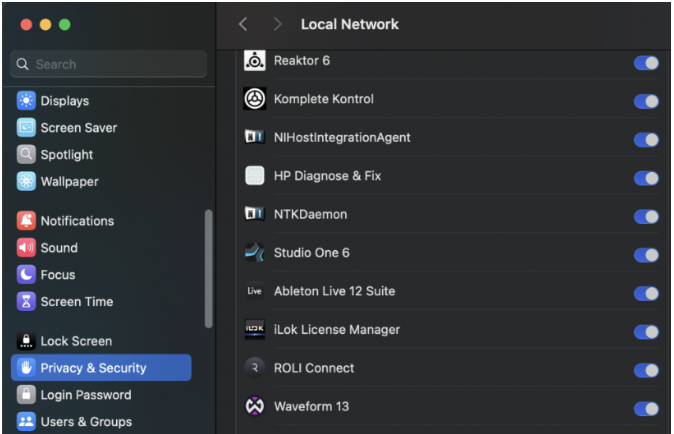
Was this article helpful?
That’s Great!
Thank you for your feedback
Sorry! We couldn't be helpful
Thank you for your feedback
Feedback sent
We appreciate your effort and will try to fix the article