MPC Standalone | Changing The Volume Of Individual Sounds In A Drum Program
Every drum sound plays an important role in shaping the feel of your beat. By adjusting the volume of individual pads, you can give key sounds such as kicks and snares more presence, while creating space for cymbals, percussion, and other elements to sit comfortably in the mix.
The MPC's Pad Mixer makes it easy to manually adjust the volume of each pad independently, allowing you to create a drum mix that suits your preferences. Please check through the steps below to get started:
1. From the Main screen, ensure the track containing your drum kit is currently active.
2. Press the Menu button, then select Pad Mixer.

3. In Pad Mixer mode, select the Volume tab. You'll see a list of all the pads assigned within your drum program, along with their individual volume controls.
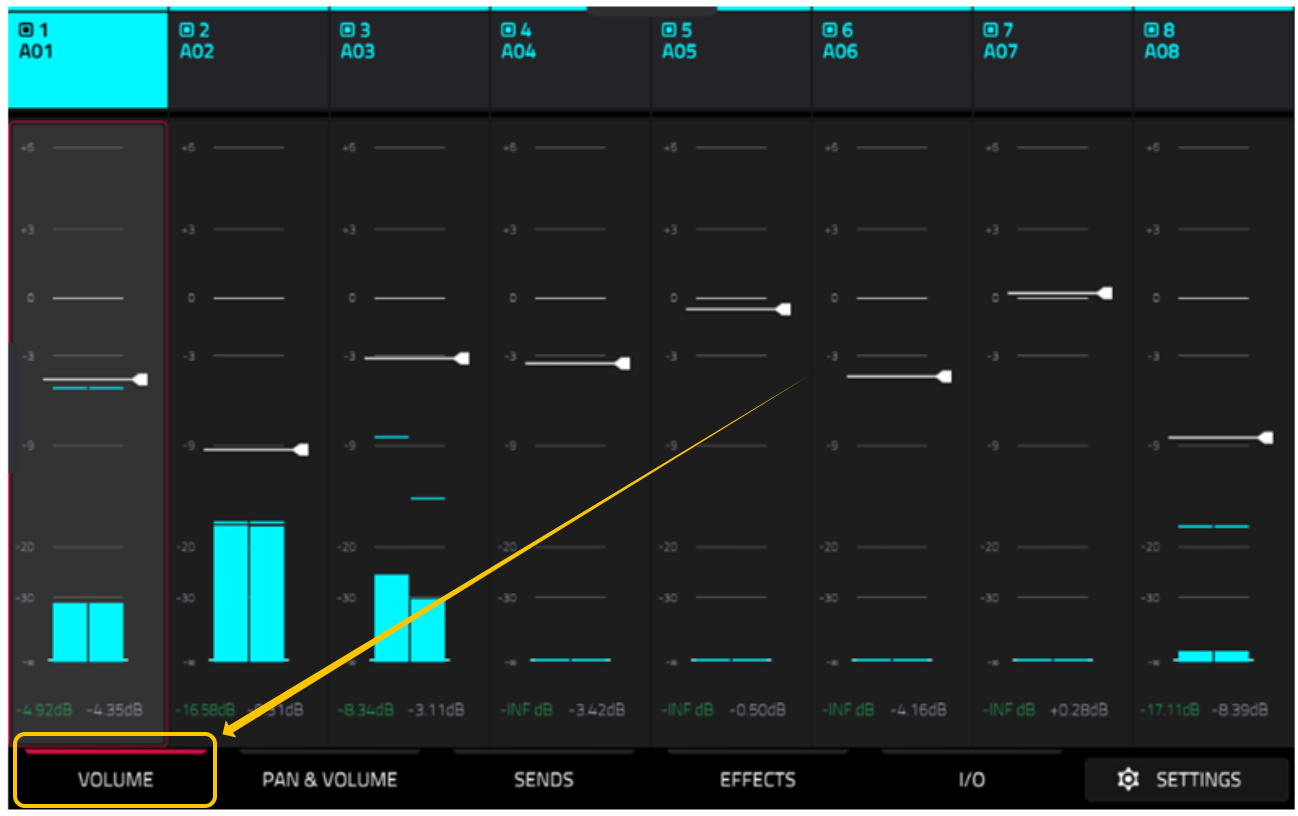
4. Select the volume meter for the pad you want to adjust (pad numbers are shown along the top of the screen), then touch and hold the white volume line while dragging it up or down to increase or decrease the pad's volume.

5. Repeat this process for your snare, hi-hats, cymbals, and any other sounds you want to balance differently.
6. Play your sequence while making adjustments to hear the changes in real time and fine-tune the balance of your kit.
Adjusting pad volumes is one of the quickest ways to improve the overall groove and clarity of your drums. For example, you may want a louder snare to cut through a mix, a more powerful kick to drive the rhythm, or quieter cymbals to prevent them from overpowering other elements. Because each pad can be adjusted independently, you have complete control over how your drum program sits within your track.
Once you're happy with the balance, save your project to preserve your changes, and you'll be ready to continue producing with a drum kit that's tailored to your mix.
Was this article helpful?
That’s Great!
Thank you for your feedback
Sorry! We couldn't be helpful
Thank you for your feedback
Feedback sent
We appreciate your effort and will try to fix the article