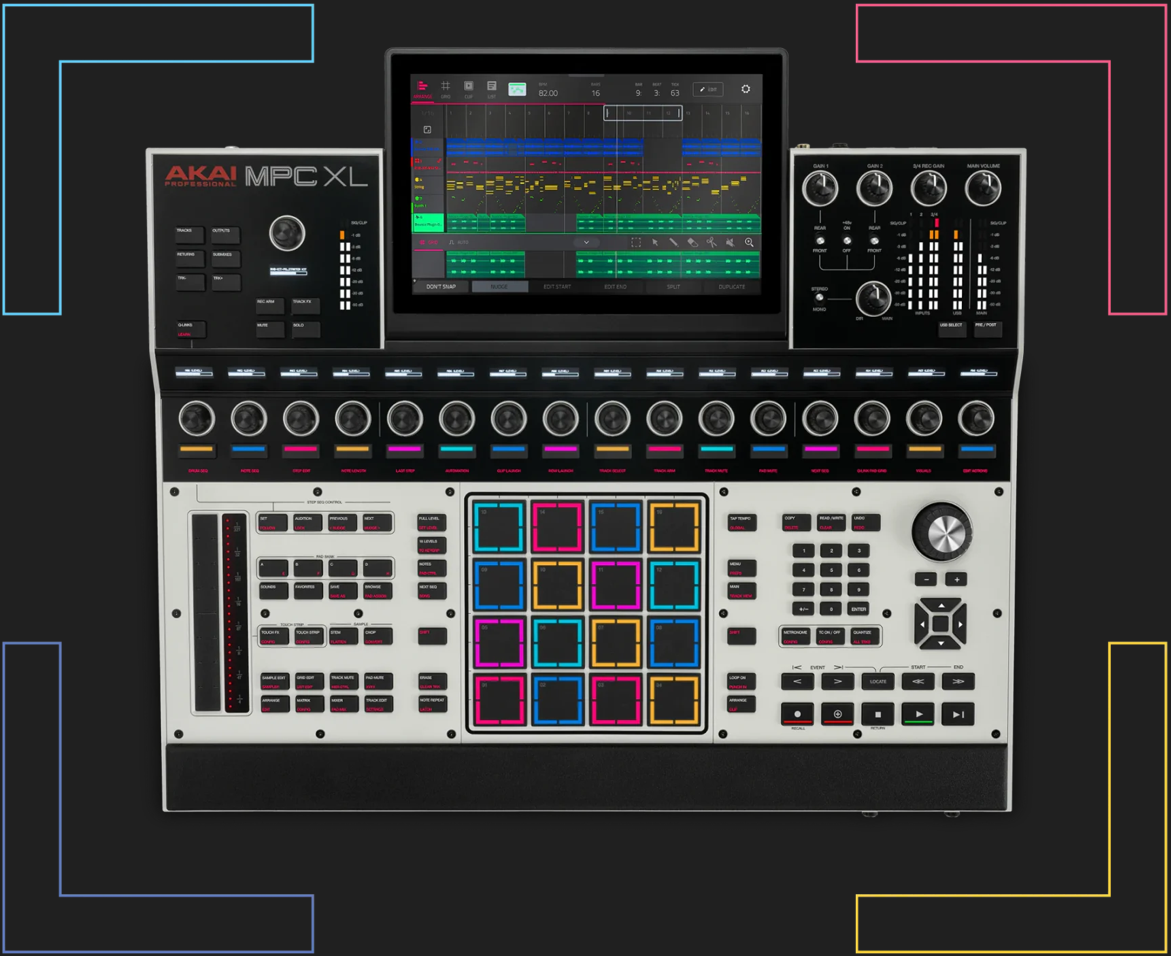
The ultimate creative engine, the newest giant in the MPC series, the MPC XL, is revolutionizing music production with its standalone features and seamless integration with the advanced MPC 3 software. This powerhouse represents a major milestone, boasting ultra-responsive MPCe expressive pads, a 16-button step sequencer, and a dynamic performance Touch Strip for thrilling control. It includes Q-Links with performance-control OLEDs for visual feedback. It offers professional-grade stem separation, lush reverb, visual EQ, and a versatile utility mixing plug-in. With 256GB of storage and cutting-edge USB-C connectivity, the MPC XL is designed for both professional studio settings and home producers. Meanwhile, the included 16x MPC expansions and Akai’s premium plug-in instrument collection enhance your sonic exploration. From clip launching to super time-stretching, this machine serves as your all-encompassing studio, ready to unleash your creativity. Refer to our guide for answers to the most frequently asked questions about this production powerhouse!
TABLE OF CONTENTS
- MPC XL - Frequently Asked Questions:
- What's the difference between the MPC X SE and MPC XL?
- What are the specifications of the MPC XL?
- What operating systems will the MPC XL be supported on?
- Will I have to update my XL firmware on Day 1?
- How do I update my firmware?
- What's the difference between the MPC Pads and the MPCe Pads?
- What's the difference in the quality of Stem Separation?
- Will the Pro Stems work on Gen 1 MPC's?
- How big is the display? Is it a touch screen?
- Is the MPC XL equipped with USB-C?
- How much storage space is available? What is the size of the internal hard drive?
- Is it possible for me to increase storage capacity?
- Can I move content directly to the Internal Drive?
- Does the MPC XL come with MPC Software version 3.6?
- How many audio tracks am I able to record?
- Is the MPC X SE Discontinued?
- Does this function with MPC 2?
- Will the MPC XL support MPC 2 Projects?
- Will the MPC XL support legacy file types?
- Where can I learn more about the Akai Pro X Spitfire Audio Collaboration?
- Connections:
- Touch Strip:
- Step Sequencer:
- Audio-Interface:
- How do I install the MPC XL Audio Driver?
- How many multiple outputs am I able to send out?
- How can I send multiple outputs from my MPC XL to my DAW?
- How can I sample directly from my computer or phone to the MPC XL?
- How many Input and Outputs can you use with an Audio Interface?
- Can I connect an External MIDI interface or Audio Interface via USB-C?
- How many MIDI channels are available through USB-C?
- What is Bi-directional MIDI?
- How Many Instances of Instrument Plugins Can the MPC XL Support in Standalone Mode?
- Does the MPC XL support sample rates over 44.1kHz when using a class compliant audio interface?
- New Factory Content and Plug-ins:
- MPC 3 PRO Pack:
- What is the MPC 3 Pro Pack?
- What is included in the MPC3 Pro pack?
- What plug-ins come with the MPC3 Pro Pack?
- What is the new standalone timestretch algorithm 'Super'?
- What are Advanced CV tracks?
- What are advanced Q-Links and how do they differ from the MPC X SE Q-Links?
- What is the Clip Launching feature?
- Can I import my Ableton Live Projects?
- Do the Gen 1 MPCs come with the MPC Pro Pack?
- How can I send a bug report to Akai?
MPC XL - Frequently Asked Questions:
What's the difference between the MPC X SE and MPC XL?
 |  |  |
| Feature | MPC X SE | MPC XL |
| Size | 19.9” x 16.7” x 3.4” / 50.5 x 42.4 x 8.7 cm (display flat) 19.9” x 15.3” x 8.4” / 50.5 x 38.8 x 21.4 cm (display upright) | 21.4” x 19.2” x 3.7” 543 x 488 x 94 mm (display flat) |
| Weight | 5.66 kg | 7.2kg |
| CPU | Gen 1 1.8GHz quad-core processor | Gen 2 8-core processor with 4x the power |
| RAM | 4GB | 16GB |
| Storage | 48GB | 256GB SSD |
| Sounds | 10GB Sound Content 3 Synth Engines | 30GB Sound Content 24 Synth Engines |
| Stems Pro | No | Yes |
| High-end FFT-based timestretch | No | Yes |
| MPCe Pads with 3D-Sensing Technology | No | Yes |
| Step Sequencer Buttons | No | Yes |
| Dual Mic Preamps | No | Yes |
| Touchstrip | No | Yes |
| Expansive UI button set with dual-zone lighting | No | Yes |
| USB-C connectivity w/expanded audio function | No | Yes |
| Clip Launch matrix view | No | Yes |
| Import / Export Ableton Projects | No | Yes |
| Import Akai Force Projects | No | Yes |
| Stereo Voice Count | 64 stereo voices | 256 Stereo voices |
| Plugin Tracks | 8 | 32 |
| Stereo Audio Tracks | 8 | 16 |
| Drum and Keygroup single track max poly | 32 | 64 |
What are the specifications of the MPC XL?
The MPC XL boasts four times the processing power of the MPC X SE CPU and comes with 16GB of RAM. For internal storage, the XL features 256GB of onboard space along with 30GB of studio-quality sounds. Additionally, you can utilize the HDD/SSD enclosure for extra storage, or utilize the SD or USB port to access your SD Card or USB Flash Drive.
What operating systems will the MPC XL be supported on?
- Windows 10
- Windows 11
- macOS 13 Ventura
- macOS 14 Sonoma
- macOS 15 Sequoia
- macOS 26 Tahoe
Note: This will necessitate the installation of the MPC XL audio driver in order to function as an Audio Interface, operate in Controller Mode, or to access the MPC XL Internal Drive, as well as to detect any attached flash drive or SATA drive for convenient file transfer.
Will I have to update my XL firmware on Day 1?
Yes, the MPC XL will receive a Day 1 Firmware update to MPC 3.7. Note: If you have any issues with connecting to Wi-Fi such as failure to recognize password, please use the desktop firmware installer, or a USB drive.
How do I update my firmware?
You can accomplish this through WI-FI on your MPC XL by navigating to MENU > PREFERENCES > INFO > UPDATE > ONLINE UPDATE.
What's the difference between the MPC Pads and the MPCe Pads?
- MPCe pads feature 16 full-size next gen velocity-sensitive RGB pads with 3D-Sensing Technology that enable you to integrate 4 unique variations of samples, articulations, or modulation, and velocity for each pad.
- MPC Gen 1 Pads are standard 16 Full-size celocity sensitive RGB Pads.
What's the difference in the quality of Stem Separation?
The MPC XL Stem Separation employs the Stems Pro desktop-grade stems algorithm.
Will the Pro Stems work on Gen 1 MPC's?
No, the Pro Stems needs our new 8 Core CPU to operate
How big is the display? Is it a touch screen?
The MPC XL boasts a 10" HD full-color, multi-touch display designed for navigating and managing the internal software. This implies that it is not only touch-responsive but also capable of recognizing multi-touch gestures such as pinching to zoom in/out and double-tapping for advanced settings.
Is the MPC XL equipped with USB-C?
Absolutely! The MPC XL includes a USB-C cable. This cable can be used for sampling directly from your computer or phone and can also serve as an audio interface or be utilized in controller mode for the MPC software.
How much storage space is available? What is the size of the internal hard drive?
The MPC XL comes with 256GB of built-in storage. It includes 30GB of studio-grade sounds pre-installed, along with limitless capacity when using the SATA enclosure or SD/USB flash drive.
Is it possible for me to increase storage capacity?
Yes! The MPC XL features 3x USB Type-A ports, 1x USB-Type-C port, SD Card slot and a SATA drive bay for a 2.5" hard drive.
Note: Kindly ensure that the drives are formatted to exFAT, FAT32, or NTFS.
Can I move content directly to the Internal Drive?
Absolutely, with the MPC XL, you can now access your Internal Drive when connecting through USB-C. This simplifies the process of backing up projects, samples, and expansions that are saved directly to your Internal Drive.
Does the MPC XL come with MPC Software version 3.6?
MPC XL comes with the newest version of the MPC Software, allowing you to use it in standalone mode or as a controller for the MPC 3.7 software when connected to your computer.
How many audio tracks am I able to record?
You can now record as many as 16 stereo audio tracks, which is an enhancement from the 8 that were available in the MPC X SE.
Is the MPC X SE Discontinued?
Yes.
Does this function with MPC 2?
No, the MPC XL is not compatible with the MPC 2 software.
Will the MPC XL support MPC 2 Projects?
Yes! The MPC XL will be compatible with projects created using the MPC 2 firmware.
Will the MPC XL support legacy file types?
Absolutely! The MPC XL will be entirely compatible with projects, programs and sequences from previous MPC model versions and legacy hardware MPC's such as the MPC5000, MPC4000, MPC3000, MPC2500/2500XL, MPC1000, and MPC500. The MPC Live III will support the following file types .AKP, . ALL, .IPT, .PGM, .PRJ, . SND, .MID, .SEQ, . APS, .50k, and .50s.
Where can I learn more about the Akai Pro X Spitfire Audio Collaboration?
You can discover more about the Spitfire Audio Collaboration by registering for updates through this link.
Connections:
How many inputs and outputs does the MPC XL have?
| Mic / Line Inputs 1-2 (1 Stereo Pair) | 2x Balanced XLR + 1/4" (6.35mm) TRS |
| Phono Inputs (1 Stereo Pair) | 2x Unbalanced RCA |
| Line Outputs 1-8 (4 Stereo Pairs) | 6x Impedance-Balanced 1/4" (6.35mm) TRS |
| Headphone Output | 1x 1/4" (6.35mm) |
| USB-C Audio Streaming | 24 Channels |
| CV/Gate Outputs | 8x Stereo 1/8" (3.5mm) |
| MIDI Inputs | 2x 5-pin MIDI |
| MIDI Outputs | 4x 5-pin MIDI |
What power supply does it use?
The MPC XL operates on a 19 V, 3.42 A, center-positive power supply, which is included.
How many Pads and Knobs are there on the MPC XL?
- 16x Q-Links with performance-control OLEDs for visual feedback
- 1x Main Volume Knob
- 2x Input 1+2 Gain Volume Knobs
- 1x 3/4 Rec Gain Knob
- 1x Encoder
- 16x Next Gen MPCe Pads with 3D-Sensing Technology
- 16x RGB Step Sequencer / Performance Pads
How many drives does the MPC XL have?
- 256gb Internal Drive
- SATA Drive bay for incorporating your own SSD
- SD Card slot for your personal SD Card
- USB Type-A slot for connecting your USB Flash Drives.
Note: USB-C Flash drives are incompatible with the USB-C port; you will require a USB Type-A adapter.
What is impedance-balanced outputs?
Impedance-balanced outputs, which are utilized in professional audio, convey signals over balanced lines to reduce noise. By maintaining equal impedance across both signal lines in relation to ground, they facilitate common-mode noise cancellation at the receiving side. This results in strong noise rejection and ensures compatibility with both balanced and unbalanced inputs, making them perfect for XLR or TRS cables.
Are MPE keyboards compatible with MPC XL?
No, the only currently compatible expressive controller able to take advantage of these functions is the MPC XL itself.
Touch Strip:
What is a Touch Strip and what are its capabilities?
The Touch Strip is a highly adaptable new tool that enables you to engage more directly with your sounds and manipulate various parameters like Mod Wheel, Pitch Bend, and more.
Can you use Touch FX with the Touch Strip?
Yes, by tapping the Touch Strip button, selecting Touch FX, and holding SHIFT + Touch Strip to access the configuration, you can choose from 20 different Touch FX Presets that include various filters, delays, turntable effects, reverbs, and modulation.
Can you route the Touch FX Destination?
Yes, when Touch FX is chosen as a Touch Strip, you can access the config by holding SHIFT + Touch Strip and adjusting the Touch FX Destination, switching between various Outputs, Submixes, Returns, and the active Track.
Why isn't my Touch Strip recording?
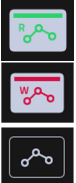
To record the Touch Strip, you need to enable automation to Write (W) on the track where you want to record it. After recording your Touch Strip, remember to switch the Automation back to Read (R).
Can you turn the Touch Strip off?
Yes, by pressing the Touch Strip and adjusting it to Off.
Step Sequencer:
What are the 16 Step Sequence Buttons?
The 16 step sequence buttons allow you to create a sequence, whether it's a drum pattern or melody, similar to what those familiar with dance or electronic music would make. You can construct a pattern,
What does the Step Edit Function do?
Using the Step Edit, you have the ability to adjust Events like Velocity, Ratchet, Probability, and Nudge Ticks, as well as modify the Envelope, Filter, and Tune/Mix for each Step.
Can I add Automation per Step?
Yes, you can add Automation by pressing Set and Step 6 (Automation).
Audio-Interface:
How do I install the MPC XL Audio Driver?
To install the audio driver, you must open the inMusic Software Center application, which can be obtained from your inMusic Profile. Select My Hardware, click on MPC XL, and then scroll down to locate the MPC XL Driver.
How many multiple outputs am I able to send out?
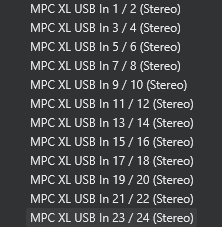
24 channels of audio via USB-C.
How can I send multiple outputs from my MPC XL to my DAW?
- Make sure that the MPC XL Audio driver is properly installed and connected via USB-C.
- On the MPC XL, navigate to the Channel Mixer, click on I/O, and set the Audio Out to USB Out 1,2, adjusting the other channels accordingly.
- On your DAW, make sure you have your MPC XL Audio Device selected.
- Create an Audio Track with the Inputs set up for each track. For example, use MPC XL USB In 1/2 (Stereo) for Audio Track 1, MPC XL USB In 3/4 (Stereo) for Audio Track 2, and so forth.
How can I sample directly from my computer or phone to the MPC XL?
To sample directly from your computer or your phone, you have 2 methods making sure that your computer or phone is connected via USB-C
- Navigate to Sampler, choose your USB Input, which in this case will be USB Input 1,2 and start recording.
- Create a new Audio Track, set the INPUT to USB Input 1,2, and record in Arrange mode.
How many Input and Outputs can you use with an Audio Interface?
When utilizing a Class-Compliant Audio Interface, the MPC XL accommodates up to 32 channels of inputs and outputs.
Can I connect an External MIDI interface or Audio Interface via USB-C?
No, you won't be able to use the USB-C for connecting MIDI or Audio Interfaces; you'll only be able to use the USB Type-A for this purpose.
How many MIDI channels are available through USB-C?
32 channels of bi-directional MIDI.
What is Bi-directional MIDI?
Bi-directional MIDI indicates that the MPC Live III is capable of both transmitting and receiving MIDI data. This means that the device will work as a MIDI controller for your DAW while in standalone mode.
How Many Instances of Instrument Plugins Can the MPC XL Support in Standalone Mode?
With four times more powerful CPU and RAM, the MPC XL can run 32 instances of Virtual Instrument Plugins like Hype, Jura, Fabric, and many more simultaneously!
Does the MPC XL support sample rates over 44.1kHz when using a class compliant audio interface?
No it does not.
New Factory Content and Plug-ins:
What plug-ins come with the MPC XL?
- AIR Music Technology - Fabric
- AIR Music Technology - MPC - Fabric Electric Piano
- AIR Music Technology - MPC - Fabric Piano
- AIR Music Technology - MPC - Fabric XL
- AIR Music Technology - MPC - Hype
- AIR Music Technology - MPC - Mellotron
- AIR Music Technology - MPC - OPx-4
- AIR Music Technology - MPC - Organ
- AIR Music Technology - MPC - Solina
- AIR Music Technology - MPC - Stage EP
- AIR Music Technology - MPC - Stage Piano
- AIR Music Technology - MPC - Studio Strings
- AIR Music Technology - MPC - AIR Chorus
- AIR Music Technology - MPC - AIR Multitap Delay
- AIR Music Technology - MPC - AIR Reverb Pro
- AIR Music Technology - MPC - AIR Vintage Filter
- AIR Music Technology - MPC - AIR Utility
- AIR Music Technology - MPC - AIR Visual EQ4
- WayOutWare - MPC - Odyssey
- Native Instruments - Analog Dreams (Kindly Activate this on your MPC XL by navigating to Preferences > Activations)
What expansions are included with the MPC XL?
- Acoustic Drum Tools (Drum Tracks)
- Welcome to ATL Songstarters (Projects)
- Classic Drum Machines (Drum Tracks)
- Electronic Horizon (Drum Tracks)
- F9 Apollo - Retro Drum Kits (Drum Tracks)
- F9 Gemini - Future Classic Synths (Keygroup Tracks)
- F9 Orion - Classic Workstations (Keygroup Tracks)
- Jamie Wilder - Lo-Fi Breeze (Drum Tracks)
- Marco Polo - LoFi Boom Vol 1 (Drum Tracks)
- Percussion Tools (Drum Tracks)
- Producer Kit Essentials (Drum Tracks)
- Snipe Young Presents - Titanium (Drum Tracks)
- Welcome To ATL Kits (Drum Tracks)
- Welcome to ATL Melodics (WAV Samples)
- Demos and Templates (6x Demo Projects and 6x Template Projects)
- Native Instruments - Lone Forest (Launch the inMusic Software Center, navigate to My Offers and use the voucher for Lone Forest)
MPC 3 PRO Pack:
What is the MPC 3 Pro Pack?
The MPC 3 Pro Pack unveils a new premium feature pack upgrade that is available with the MPC XL.
What is included in the MPC3 Pro pack?
- MPC Clip Launch including Matrix and Clip Edit Mode, Follow Actions, Row Launch Tempo, Row Launch Snapshots, and Ableton Live Project Import
- Advanced CV
- Advanced Q-Links, including Q-Link Envelope Follower and LFO
- Super Warp Algorithm (Standalone Only)
What plug-ins come with the MPC3 Pro Pack?
- AIR Fabric Select
- AIR Visual EQ4
- AIR Reverb Pro
- AIR Utility
What is the new standalone timestretch algorithm 'Super'?
This innovative timestretch algorithm delivers high-quality FFT-based time stretching and pitch shifting.
What are Advanced CV tracks?
Advanced CV presents significant improvements to the CV tracks in MPC, providing an extensive range of modulators and utilities that substantially increase control over external CV-enabled devices.
What are advanced Q-Links and how do they differ from the MPC X SE Q-Links?
- Q-Links: Q-Links are a collection of touch-sensitive knobs on the MPC that offer hands-on, real-time management of vital parameters in your projects.
- Advanced Q-Links: With Advanced Q-Links, you can now utilize an audio signal, like a kick drum, as a control signal to generate envelope followers, side chaining, or modulation effects. In the Q-Link Edit mode, there are 16 assignable envelope followers available from the Mode drop-down menu.
What is the Clip Launching feature?
For those acquainted with the Akai Force, the workflow remains the same. The Clip launching feature allows you to trigger individual clips or rows of clips while in the new Clip Matrix Mode.
Can I import my Ableton Live Projects?
Yes you can! Making sure you select the "Collect All and Save" option in Ableton Live.
Note: The MPC Live III will import the following:
- Launch Matrix Tracks/Clips To Tracks/Clips.
- Arrangement View Sequence to Arrange tracks.
- ALS Colors to MPC Colors for pads.
- Audio Clips to Audio Clips (with Looping points, names, warp, volume, pan, pitch adjustment)
- MIDI Notes to MIDI Notes at 960 PPQ units, with looping points and names.
- Basic conversion of ALS Drum Rack to XPJ Drum Kit. Only one “Selection” is handled. A maximum of four velocity variations per instrument.
- Basic conversion of ALS Impulse Instrument to XPJ Drum Kit.
- Basic conversion of ALS Sampler to XPJ Keygroup. (128 keygroup limit). Only one “Selection” is handled.
- Basic conversion of ALS Simpler to XPJ Keygroup.
- Plugin instrument tracks are converted to MPC MIDI tracks.
Do the Gen 1 MPCs come with the MPC Pro Pack?
No, this will have to be purchased.
How can I send a bug report to Akai?
We want to hear what you have to say; what features you like, dislike, and anywhere improvements can be made. In MPC 3.6.
Kindly utilize this Feedback Form to submit your notes and crash reports for our team to review and take into account for the upcoming update.
Was this article helpful?
That’s Great!
Thank you for your feedback
Sorry! We couldn't be helpful
Thank you for your feedback
Feedback sent
We appreciate your effort and will try to fix the article