Native Access Error Message: "Installation has been prevented. You do not have enough free drive space to install the products."
Symptom
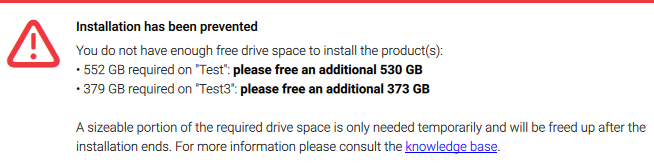
You receive the following error message while installing a product with Native Access:
Installation has been prevented
Cause
The installation process of a Native Instruments product requires temporarily extra space on your internal hard drive (or 'system drive'), even if you want to install the product on an external hard drive.
Info on Free Space and Purgeable Space (Mac)
Please note that to find out the actual free space available on your system drive, you need to access the application Disk Utility. You find this in: Applications > Utilities > Disk Utility.
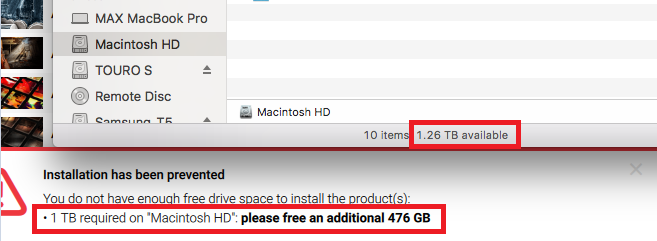
This is necessary, because simply right-clicking on the Mac HD in Finder and choosing "Get info" will show the summation of free space and purgeable space.
Native Access calculates the amount of free space an installation requires from the available free space only (excluding the purgeable space). This is why you may see what is presumably enough free space available, although Native Access requests more:
It is possible to delete purgeable data or move it to your iCloud. Please contact Apple for information on how to do this.
Solutions
Change the Download and Content Location
We recommend to change the Download Location and Content Location in Native Access to a separate hard drive.
However please note that it is still the local system drive which requires free space to perform the installation, even when you choose an external disk as the download and content location.
Installing Products Individually
If you receive this error message when installing a KOMPLETE Bundle, run the product's installers individually instead of using the Install All button.
Time Machine Snapshots (Mac)
Time Machine snapshots may be occupying large amounts of storage. Please contact Apple to learn how to manage those snapshots so that they do not occupy space on your local disk.
Was this article helpful?
That’s Great!
Thank you for your feedback
Sorry! We couldn't be helpful
Thank you for your feedback
Feedback sent
We appreciate your effort and will try to fix the article