This guide provides an overview of how to download, install, and activate Native Instruments products. The process may vary depending on the product type.
TABLE OF CONTENTS
- 1. Native Access: The central hub
- 2. The NI Download Manager
- 3. iZotope and Plugin Alliance products
- 4. OEM and third-party Kontakt libraries
- 5. Drivers and firmware for NI hardware
1. Native Access: The central hub
For the vast majority of Native Instruments products, Native Access is the central point for downloading, installing, activating and updating your software.
Once you log in with your NI account, your products appear in the Home or Library tabs.
When you purchase a product from the NI webshop, it is automatically added to Native Access.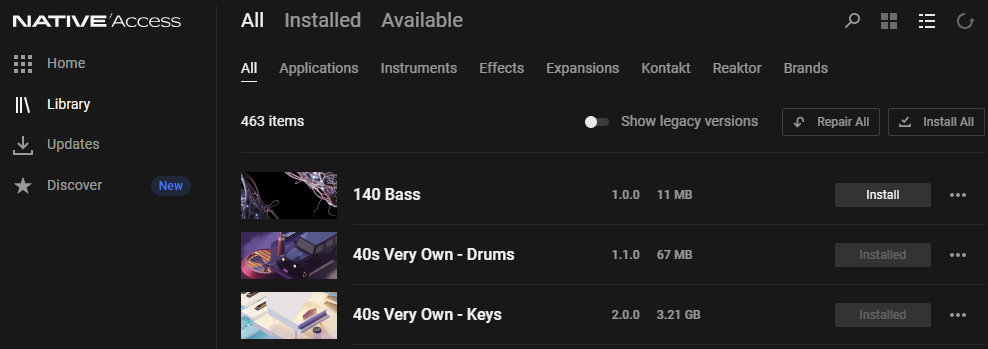
After installing a product, it is registered to your account and activated. Note: some third-party libraries come with a serial number that must be added manually in Native Access.
2. The NI Download Manager
If you have issues with downloading or installing a product with Native Access, you can find direct installers in the NI Download Manager.
You can use the Download Manager to get a direct installer (ISO or ZIP) for a specific product version, or if Native Access can't download due to network restrictions, etc.
Please note that the Download Manager is mainly a troubleshooting tool for downloading standalone installers and does not provide the automated "one-click" updates available in Native Access.
3. iZotope and Plugin Alliance products
The latest versions of iZotope products (Ozone 12, RX 11, etc.) are fully integrated into Native Access and can be downloaded and installed from there.
Legacy versions (e.g. Ozone 9, RX 9, etc.) can be downloaded from the iZotope website: Legacy Products
All Plugin Alliance products can be installed with the Plugin Alliance Installation Manager. Some products that come with NI 360 or Komplete bundles can be installed with Native Access.
4. OEM and third-party Kontakt libraries
For third-party Kontakt libraries (OEM products), the installation method depends on whether it is one of the following:
- a third-party library purchased through the Native Instruments webshop
- a third-party library with a serial number purchased via the original manufacturer's webshop
- a third-party library without a serial number
5. Drivers and firmware for NI hardware
Hardware devices like Traktor / Maschine controllers, Komplete Audio interfaces, and Kontrol Keyboards may require specific drivers or firmware versions to function correctly.
Drivers:
On Windows, specific drivers are often required. On macOS, most NI hardware is "class-compliant" and does not require a driver (though some legacy devices may). Here is the Drivers & Other Files download page.
Firmware:
A "firmware" is the internal software running on the hardware device itself. It is important to keep this updated for stability and new features.
You can download the latest drivers and firmware updaters from our Drivers & Other Files download page.
Was this article helpful?
That’s Great!
Thank you for your feedback
Sorry! We couldn't be helpful
Thank you for your feedback
Feedback sent
We appreciate your effort and will try to fix the article