How to install and authorize the Music Production Suite Bundle
Introduction
The iZotope Music Production Suite Bundle includes products from iZotope, Plugin Alliance / Brainworx, Native Instruments and Celemony.
To install all products included with this bundle, please be sure to follow each company's instructions below. Please have the emails ready that contain your serial numbers and codes.
Here's a product overview of each company's components and the number of serial codes you need to use in order to register them:
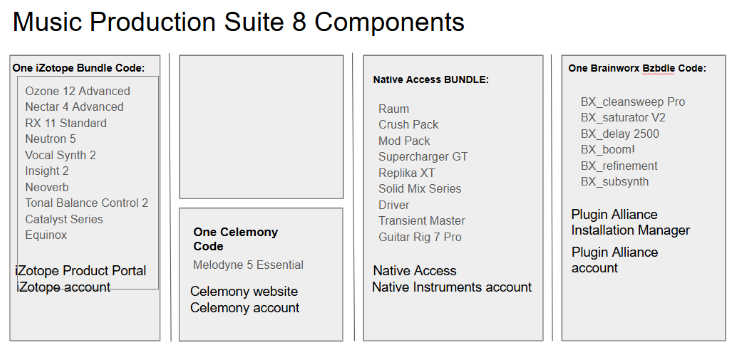
iZotope Products
Create an iZotope account (if you haven't already) and install Product Portal. Then you can authorize the products to your computer or iLok USB and install them.
You can create an iZotope account on this page: https://www.izotope.com/en/account/login
Download and install the iZotope Product Portal: https://support.izotope.com/hc/en-us/articles/6658125027345
If the bundle was purchased through iZotope.com or native-instruments.com, the serial numbers will be automatically added to your iZotope account. If the bundle was purchased via a third party, you will need to add the serial numbers to the Product Portal.
Example of an iZotope serial number: SN-MPS5-ENKB-5X39-367B-XXXX
Plugin Alliance / Brainworx Products
Create an account at Plugin Alliance (if you have not already), redeem your code and install the products with the PA Installation Manager.
- Create a free Plugin Alliance Account or log in.
- Visit the product page for Brainworx Creative Mixing Set.
- Click Add to cart. Please don't add any other products to the cart.
- Click Checkout.
- Apply your voucher code that you received via your order confirmation email.
Example of a Plugin Alliance redemption code: NI-MUSIC-PRODUCTION-SUITE-X-XXXXXXX - This will bring the cost down to 0.
- Check out.
- Use the Plugin Alliance Installation Manager to install your plug-ins.
Native Instruments Products
Create a Native Instruments account (if you haven't already), install Native Access and install your products.
You can create a Native Instruments account on this page: https://www.native-instruments.com/account
Download and install Native Access: https://www.native-instruments.com/specials/native-access-2/
Start Native Access and log in. Open the Library tab and install your products.
Celemony's Melodyne 5 Essential
Visit this page to create a Celemony account (if you haven't already).
Once logged in to your account, visit this page and click Register serial number.
Enter the serial number you have received via email and register it.
Now you can download Melodyne 5 Essential directly from the License Overview page.
Exponential Audio Products
Note: earlier versions of Music Production Suite included products from Exponential Audio. If you own one of the earlier versions, find out how to install and authorize them here:
Use the direct download links on the iZotope website to install your products. Then create an iLok account (if you haven't already) and authorize your products to your computer or iLok.
Visit this page to download the Exponential Audio product installers: https://www.izotope.com/en/products/downloads.html
Example of an Exponential Audio activation code: 9377-9276-9907-7261-3355-8196-XXXX-XX
And here's the overview for the Music Production Suite Pro Subscription:
iZotope Products
Please follow these steps:
- Download and install Native Access and log in with your Native ID.
- Open the Subscriptions tab and install your products:
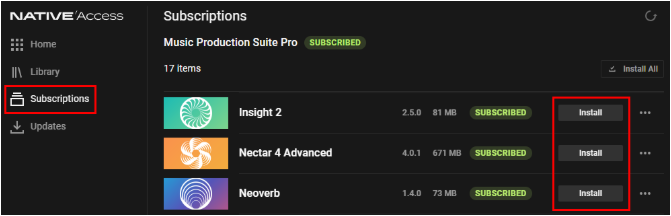
- Open your DAW and rescan for plug-ins to get started.
I don't see my products in Native Access
- Make sure you're logged in with the correct Native ID (email address).
- Click the refresh button in the upper right of Native Access:

- Restart your computer.
Celemony's Melodyne 5 Essential
Visit this page to create a Celemony account (if you haven't already).
Once logged in to your account, visit this page and click Register serial number.
Enter the serial number you have received via email and register it.
Now you can download Melodyne 5 Essential directly from the License Overview page.
Was this article helpful?
That’s Great!
Thank you for your feedback
Sorry! We couldn't be helpful
Thank you for your feedback
Feedback sent
We appreciate your effort and will try to fix the article