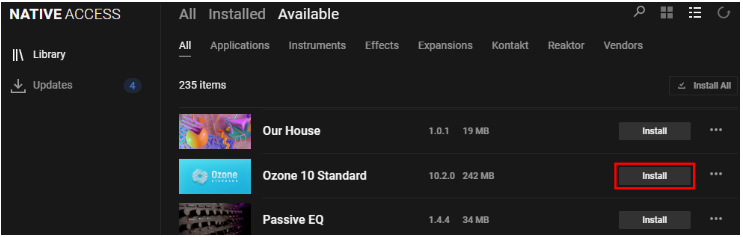
In order to install Komplete's Ozone, simply start Native Access and open Library > Available. Now you can click the Install button for your version of Ozone:
Further Info:
- Native Access 1 is not supported. You must use the new Native Access to install Ozone.
- Please note that there is no standalone application of Ozone. Ozone is available in the plug-in formats AU, VST3 and AAX. It is not available in the VST2 format.
- The installation and activation of Ozone, purchased as part of Komplete, is handled exclusively by Native Access and is independent from Izotope's Product Portal. Its appearance in Product Portal as 'Full Trial' does not affect its functionality as long as it appears as activated in Native Access.
- Ozone 10 requires macOS 10.15. Ozone 11 requires macOS 12. ozone 12 requires macOS 13. It is not displayed in Native Access on earlier macOS versions.
Was this article helpful?
That’s Great!
Thank you for your feedback
Sorry! We couldn't be helpful
Thank you for your feedback
Feedback sent
We appreciate your effort and will try to fix the article