Logic Pro Error Message: "Plug-in for device Komplete Kontrol / Maschine is missing"
Symptom
When you start Logic Pro, you receive the following error message for Komplete Kontrol or Maschine:
Plug-in for device "Komplete Kontrol S-Series" is missing or
Plug-in for device "Maschine MK3" is missing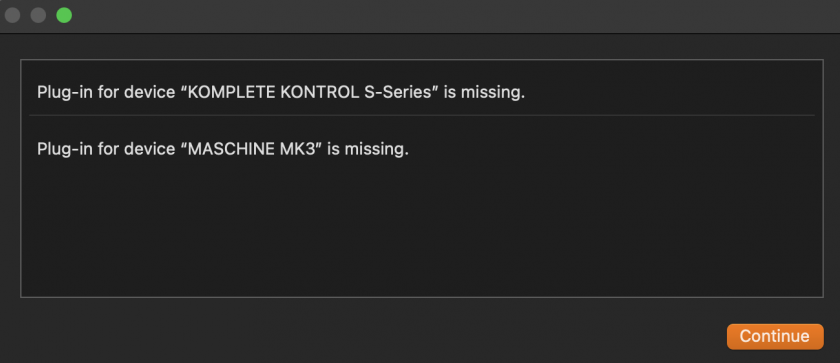
Solution
- Quit Logic Pro and open Finder.
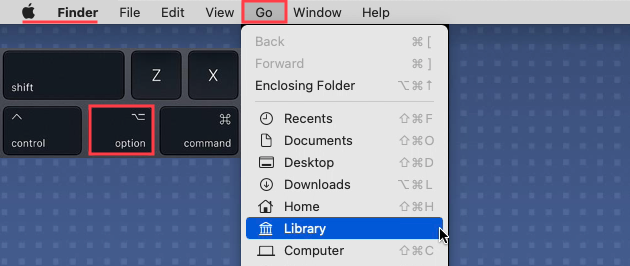
- Open the User Library: Click Go in the menu bar, hold down the Option / Alt key and select Library from the menu:
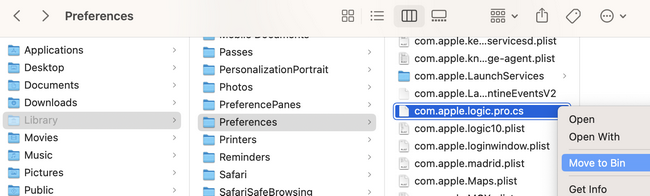
- Navigate to Library > Preferences.
- Delete the file com.apple.logic.pro.cs
- Start Logic Pro.
Logic should start as expected now.
Was this article helpful?
That’s Great!
Thank you for your feedback
Sorry! We couldn't be helpful
Thank you for your feedback
Feedback sent
We appreciate your effort and will try to fix the article