Kontrol S-Series MK3: Avoiding Connection Issues by Using the Right USB-C Hubs and Cables
Important: Many connection issues can be avoided by using a USB-C hub instead of connecting your keyboard directly to your computer. Here you will find info on choosing the right hubs and cables:
USB-C Hubs
- Make sure that the USB-C hub supports power delivery and data transfer functionality.
- Some USB-C hubs have additional ports exclusively designed for charging and don't support data transfer. Don't use these ports to connect your Kontrol MK3 keyboard.
- On Windows, deactivate the "USB selective suspend settings". You can find them here:
Click the Windows Start Button, type Edit power plan and hit enter.
Go to Change advanced power settings > USB settings > USB selective suspend settings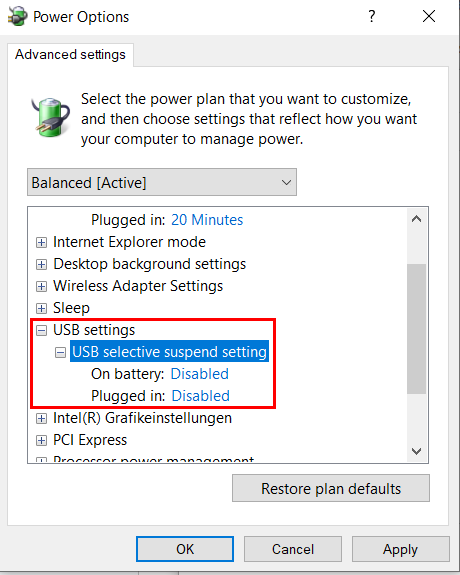
USB-C Cables
- Similar to hubs, make sure that the USB-C cable supports power delivery and data transfer functionality.
- It's important to use high-quality cables, whether to connect with a hub or with the keyboard. Cheap or damaged cables can cause connection problems, data transfer failures, or intermittent connectivity.
Was this article helpful?
That’s Great!
Thank you for your feedback
Sorry! We couldn't be helpful
Thank you for your feedback
Feedback sent
We appreciate your effort and will try to fix the article