If you see a “Missing Product” error in KOMPLETE KONTROL, it usually means the product library cannot be found in its expected location.
Missing Product
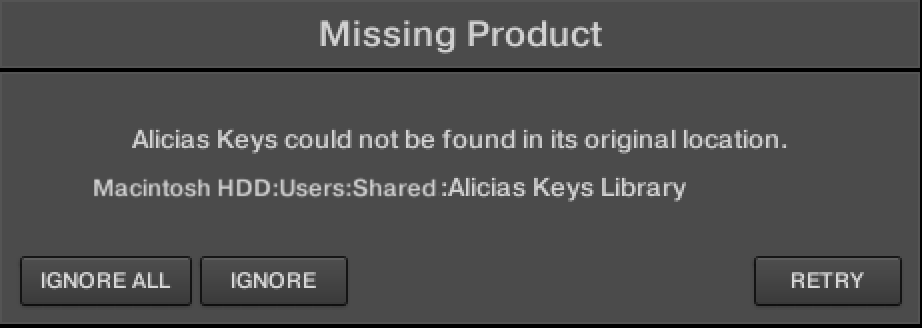
TABLE OF CONTENTS
This error appears when loading a preset if the required product library is missing or not detected.
Common Causes
- The library has been moved to a different location
- The drive containing the library has been renamed or disconnected
How to fix it
- Open the KOMPLETE KONTROL Preferences and select Library > Factory.
- Click on the folder icon of the product's entry.
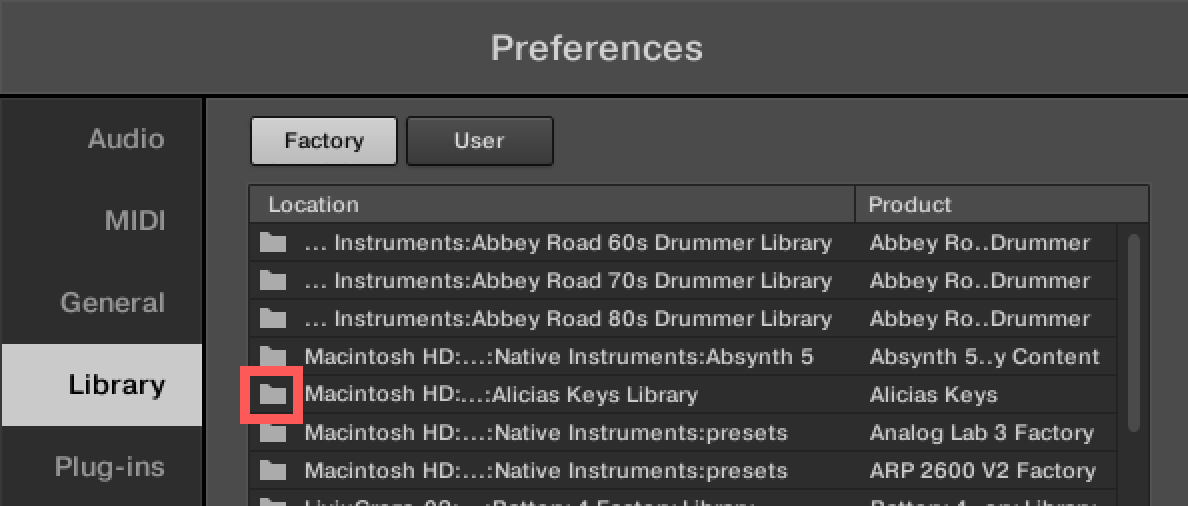
- Navigate to the Library's current location and confirm the selection.
- Click the Rescan button.

You may close the Preferences now.
Additional Options
Repair in Native Access
Use the repair function to relink missing content
Restore original location or drive name
If the library was moved or the drive name changed, return it to its original path
Was this article helpful?
That’s Great!
Thank you for your feedback
Sorry! We couldn't be helpful
Thank you for your feedback
Feedback sent
We appreciate your effort and will try to fix the article