KOMPLETE KONTROL MK1 keyboards offer different levels of host integration depending on your DAW. Supported hosts provide advanced control, while others offer more limited functionality.
TABLE OF CONTENTS
- Supported DAWs with advanced integration include:
- Using MK1 in other DAWs
- Integration of KOMPLETE KONTROL MK 1 in Other Hosts
- Using Multiple Hosts with KOMPLETE KONTROL MK1 at the Same Time
Supported DAWs with advanced integration include:
- Ableton Live
- Logic Pro X
- GarageBand
- Cubase Artist / Pro
- Nuendo
In these hosts, you can:
- Control transport functions (play, stop, etc.)
- Navigate tracks and control key DAW features
- Automatically focus and control the selected track’s KOMPLETE KONTROL instance
Using MK1 in other DAWs
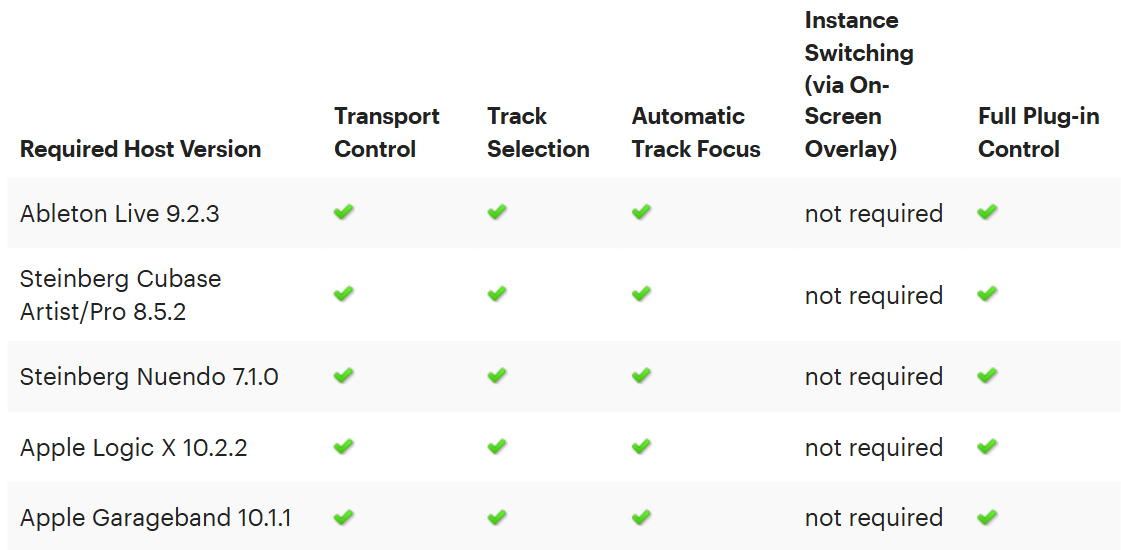
The first-generation KOMPLETE KONTROL MK1 keyboards offer advanced integration in supported versions of Logic Pro X, GarageBand, Live, Cubase Artist/Pro and Nuendo (see table below). This enables you to control the transport functions of your sequencer (play, stop, etc.) from the hardware, navigate through the tracks in your projects and control important functions such as undo, redo, metronome, count-in and Loop position (Logic Pro X, GarageBand, Cubase Artist/Pro and Nuendo only). You will also benefit from automatic track focus, which means that the hardware will always be mapped to the KOMPLETE KONTROL plug-in instance inserted in the currently selected track. Additionally, the selected track in your host will be armed for recording. This is required to route the MIDI notes from the hardware's keybed to the currently selected plug-in instance. If the selected track contains a third-party plug-in instead of KOMPLETE KONTROL, the hardware automatically switches to MIDI mode.
Note: The INSTANCE button on the hardware will not be active when using a host with advanced integration. In this case, switching between the KOMPLETE KONTROL instances is handled by the automatic track focus.
Integration of KOMPLETE KONTROL MK 1 in Other Hosts
If you are using the KOMPLETE KONTROL plug-in in other hosts, track selection and automatic track focus are not supported. However, by pressing the INSTANCE button on your first-generation KOMPLETE KONTROL MK1 keyboard, you can call up an overlay on the computer screen which enables you to switch between all loaded instances of the plug-in.
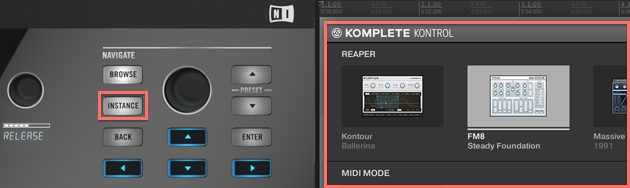
This also works across multiple hosts, which will be listed in the on-screen overlay. After calling up an instance from the on-screen overlay, you will get full control over the KOMPLETE KONTROL plug-in from the hardware. Since automatic track focus is not supported in these hosts, you have to manually arm the corresponding track in in order to route the MIDI notes from the hardware's keybed to the plug-in.
The transport control buttons of the first-generation KOMPLETE KONTROL MK1 keyboard can be used with any host which supports the MCU (Mackie Control Universal) protocol.
Note that full KOMPLETE KONTROL plug-in control (including KOMPLETE Browser, Native Map, Light Guide and the perform features) is available in any host software which supports the available plug-in formats:
- OS X: VST 64-Bit, AU 64-Bit, AAX 64-Bit
- Windows: VST 32 & 64-Bit, AAX 32 & 64-Bit
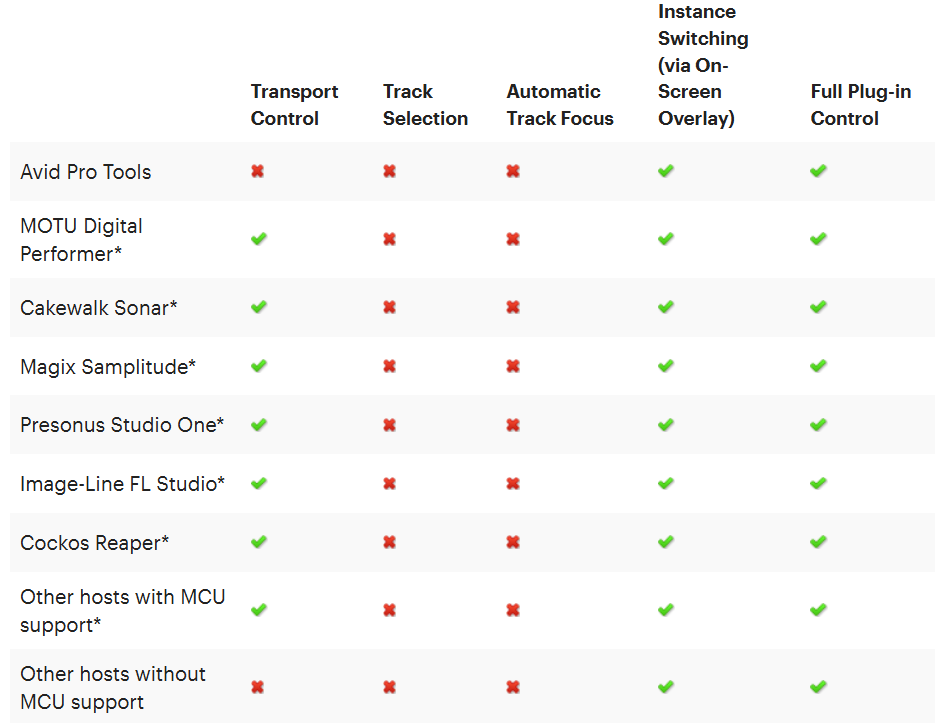
*In order to enable transport control, you have to configure your KOMPLETE KONTROL S-Series as an MCU control surface in your host. Please consult the manual of your host software for more information.
Using Multiple Hosts with KOMPLETE KONTROL MK1 at the Same Time
You cannot run two supported hosts with advanced integration at the same time. Running one supported host and one unsupported host at the same time is possible, however, the track selection buttons on the hardware will always shift the focus to the supported host and its plug-in instances. For hardware control of KOMPLETE KONTROL MK1 in the unsupported host, you have to manually bring the plug-in instance into focus using the computer mouse and keyboard. Note that the INSTANCE button and on-screen display are not available when a supported host is running on the system.
Was this article helpful?
That’s Great!
Thank you for your feedback
Sorry! We couldn't be helpful
Thank you for your feedback
Feedback sent
We appreciate your effort and will try to fix the article