Maschine 1 / 2 as a Plug-in
If Maschine is loaded as a plugin in a host sequencer, the PLAY button on the Maschine controller is disabled. All transport functions in Maschine are controlled by the sequencer to synchronize the playback.
Maschine 2 Software Standalone
If the PLAY button does not work when using Maschine 2 in standalone mode, a MIDI Sync Mode may be active. Open the MIDI tab in the Preferences and choose Off from the dropdown menu next to Mode, to enable the PLAY button again.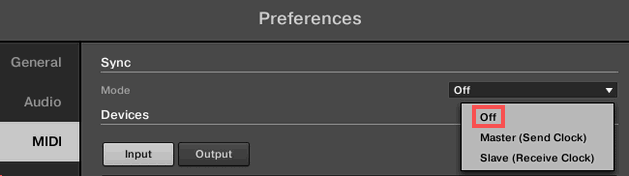
Maschine 1 Software Standalone
If the PLAY button does not work when using Maschine 1 in standalone mode, the function Sync to External MIDI Clock in the File menu may be active. This is indicated by a dot or check in front of the menu entry. Deactivate the function by clicking the menu entry.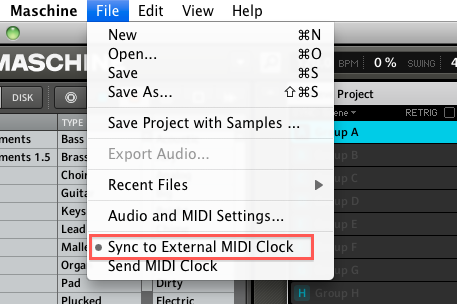
Was this article helpful?
That’s Great!
Thank you for your feedback
Sorry! We couldn't be helpful
Thank you for your feedback
Feedback sent
We appreciate your effort and will try to fix the article