Native Instruments Support Music Production Hardware

MASCHINE | Adjusting The Pad Sensitivity

If the pads on your MASCHINE controller are not responding as expected, you can recalibrate them by following the steps below.


1. Open Preferences in MASCHINE 2 and navigate to Hardware > Pad Sensitivity.


2. Use the Sensitivity slider to adjust how the pads respond to your touch.


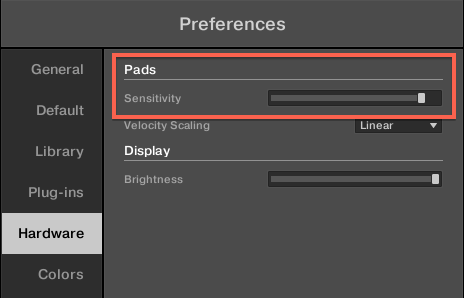
This setting controls the threshold at which a pad hit is detected. Gradually move the slider from right to left until you find a level that feels comfortable for your playing style. The configuration shown in the image below can be used as a helpful reference point.

If your MASCHINE Controller's Pads do not react as expected or become irresponsive, it can be helpful to recalibrate them by adjusting their Sensitivity.
  1. Launch MASCHINE 2 and go to Preferences > Hardware > Pad Sensitivity.
  2. Use the Sensitivity slider to adjust how sensitive the pads respond to your touch. This sets the minimum threshold at which the MASCHINE controller will register a hit. Move the slider gradually from the right to the left until you find a setting which suits you best. The setting below is a good reference point:

Was this article helpful?

That’s Great!

Thank you for your feedback

Sorry! We couldn't be helpful

Thank you for your feedback

Let us know how can we improve this article!

Select at least one of the reasons
CAPTCHA verification is required.

Feedback sent

We appreciate your effort and will try to fix the article