TABLE OF CONTENTS
- What is the Calibration Data feature?
- How can I make NAM behave like it did in version 5.1?
- What do the Output Mode options do?
- Why are the Calibration Data options greyed out?
- Do all NAM profiles contain calibration data?
- Will changing these settings affect all NAM profiles?
What is the Calibration Data feature?
The Calibration Data feature allows Neural Amp Modeler (NAM) profiles to use calibration information that may have been captured when the profile was created. This feature can be enabled or disabled as needed.
How can I make NAM behave like it did in version 5.1?
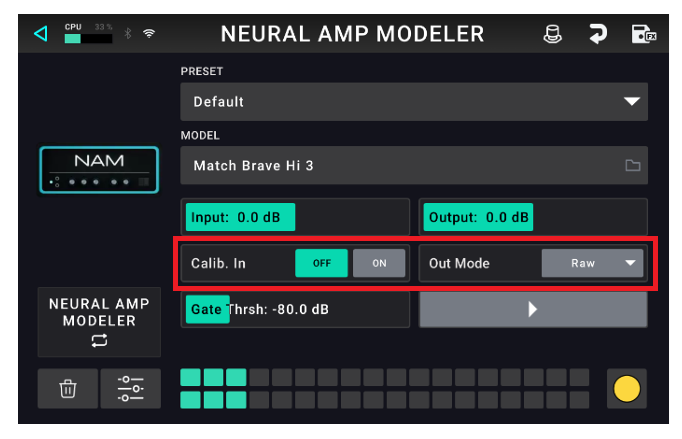
If you prefer the behaviour from version 5.1, use the following settings:
Set Calibrate Input to Off
Set Output Mode to Raw
These settings effectively bypass the calibration data and provide behaviour similar to previous versions.
What do the Output Mode options do?
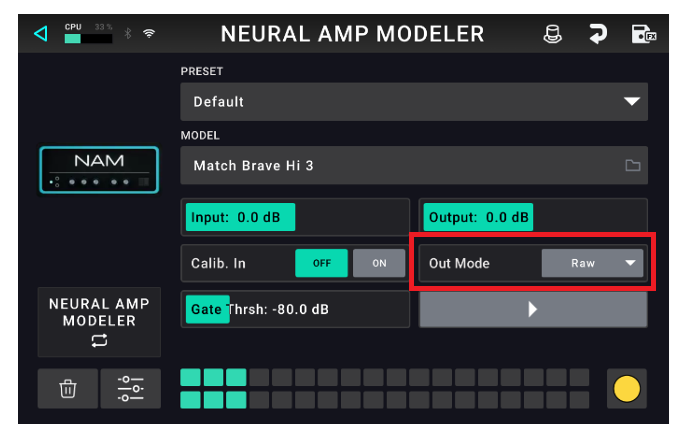
Choose one of the following modes to configure how the capture’s output gain is adjusted.
Raw: In this mode, the raw output follows the exact dynamics of the model, which might be louder or quieter depending on the amp.
Calibrated: In this mode, the output gain will be calibrated using the stored metadata (if available) from when the capture was created.
Normalize: In this mode, the output gain is automatically adjusted so that it stays within a safe range (regardless of input gain or capture type) and its peak amplitude will match a target level to prevent clipping or very quiet signals.
Why are the Calibration Data options greyed out?
These controls are only available when the loaded NAM capture contains calibration metadata that was saved when the capture was originally created.
Not all NAM creators capture or store this data. If the NAM file does not contain calibration metadata, the Calibrate Input and Output Mode parameters will be unavailable (greyed out).
In these cases, the capture will already behave similarly to earlier firmware versions, as no calibration data is present to be applied.
Do all NAM profiles contain calibration data?
Will changing these settings affect all NAM profiles?
No. These settings only affect profiles that have calibration data embedded within the NAM file. Profiles without calibration data are unaffected.
Was this article helpful?
That’s Great!
Thank you for your feedback
Sorry! We couldn't be helpful
Thank you for your feedback
Feedback sent
We appreciate your effort and will try to fix the article