AIR Fabric Vintage Synths Collection Volume 1 brings together Fabric Vintage Pro, Fabric Vintage Jup, and Fabric Vintage Memorymoog, three of the most influential analog polysynths ever created, reimagined through the Advanced Multi-Sample Synthesis Fabric Engine.
AIR Fabric Vintage Synths Collection Volume 2 brings together Vintage Matrix, Vintage Andromeda, and Vintage CS, three of the most revered and expressive analog synthesizers ever created, reimagined through AIR Music Tech’s modern synthesis architecture for MPC and desktop production environments.
Rather than producing strict, like-for-like emulations, this collection captures the sonic DNA of the originals and places it inside a powerful, modern instrument designed for how producers, composers, and synthesists actually work today.
In this article, you'll find a walkthrough of all the key features and controls you can explore for each synth in the Fabric Vintage Synths Collection, as well as system recommendations and frequently asked questions.
TABLE OF CONTENTS
- Walkthrough Videos
- Meet the synths included in the Fabric Vintage Synths Collection
- Frequently Asked Questions
Walkthrough Videos
Fabric Vintage Jup Walkthrough
Fabric Vintage Memorymoog Walkthrough
Fabric Vintage Pro Walkthrough
Fabric Vintage Andromeda - Walkthrough
Fabric Vintage CS - Walkthrough
Fabric Vintage Matrix - Walkthrough
Meet the synths included in the Fabric Vintage Synths Collection:
Volume 1
Fabric Vintage Jup
Vintage Jup brings the bold, wide, and unmistakably lush character of the Jupiter-8 into the Fabric ecosystem. From shimmering pads and vibrant arpeggios to powerful unison leads, Vintage Jup retains the clarity and presence of the original while unlocking modern polyphony, advanced modulation, and performance-ready control.
Fabric Vintage Memorymoog
Vintage Memorymoog delivers massive, harmonically rich textures with a depth and density that defined an era of analog synthesis. Famous for its huge unison sounds and expressive polyphonic power, Vintage Memorymoog becomes even more versatile inside Fabric—capable of everything from classic analog grandeur to modern cinematic and experimental sound design.
Fabric Vintage Pro
Vintage Pro captures the unmistakable warmth, punch, and musical immediacy of the Prophet lineage, then expands it into a flexible modern instrument. Known for its expressive pads, authoritative basses, and iconic polyphonic leads, Vintage Pro delivers that classic sound with expanded modulation, layering, and effects, perfect for contemporary electronic, pop, and cinematic production.
Volume 2
Fabric Vintage Matrix
Fabric Vintage Matrix captures the unmistakable depth, complexity, and evolving character of the legendary Matrix-12, then expands it into a powerful modern instrument. Renowned for its lush pads, sophisticated textures, and endlessly expressive modulation possibilities, Fabric Vintage Matrix delivers the iconic sound of one of analog synthesis' most celebrated polysynths with enhanced layering, modern effects, and performance-focused controls, perfect for contemporary electronic music, film scoring, ambient production, and advanced sound design.
Fabric Vintage Andromeda
Fabric Vintage Andromeda brings the expansive, deeply expressive character of the legendary A6 Andromeda into the Fabric ecosystem. From massive analog pads and evolving textures to powerful basses and richly detailed leads, Fabric Vintage Andromeda captures the depth, warmth, and sonic complexity of the original while unlocking modern polyphony, advanced modulation, integrated effects, and performance-ready control for today's producers and sound designers.
Fabric Vintage CS
Fabric Vintage CS delivers the unmistakable warmth, expressiveness, and cinematic grandeur that made the legendary CS-80 one of the most iconic synthesizers ever created. Renowned for its soaring leads, lush pads, and deeply emotional performance capabilities, Fabric Vintage CS captures the character and nuance of the original while expanding it through the power of the Fabric engine. From timeless analog textures and expressive soundtrack sounds to modern ambient, electronic, and cinematic productions, Fabric Vintage CS offers a uniquely inspiring synthesis experience that bridges vintage authenticity with contemporary creative flexibility.
Frequently Asked Questions
What are the key features of the Vintage Synths Collection Volume 1?
- Up to 4 oscillators/layers per patch
- Expanded polyphony
- Multiple modern filter types
- Two multi-sample layer oscillators plus one percussive layer
- Independent filter, envelope, and LFO controls per layer
- Powerful arpeggiator with multiple modes and performance controls
- MPE compatibility
- Assignable mod wheel, aftertouch, expression, and footswitch control
- Extensive preset libraries covering basses, pads, leads, sequences, and cinematic textures
- A modern FX section that goes far beyond original hardware limitations
What are the key features of the Vintage Synths Collection Volume 2?
- 180+ professionally designed presets
- 2 Main Oscillators plus Sub Oscillator and Noise Generator
- 5 Independent LFOs
- Dedicated Amp, Filter, and Pitch Envelopes
- Comprehensive FX section derived from Sprite
- Powerful Arpeggiator with performance controls
- MPE Compatibility
- Assignable Mod Wheel, Aftertouch, Expression, and Footswitch control
- Extensive libraries of pads, basses, leads, sequences, keys, textures, and cinematic sounds
How do I Install and Activate AIR Fabric Vintage Synths Collection?
Please refer to the following guides:
- Desktop: Installing and Activating your AIR Plugins
- MPC OS Standalone: Installing and Activating your AIR Plugins
Which Plug-in formats are available?
Fabric Vintage Synths Collection supports the following plug-in formats:
- VST
- VST2
- AAX
- AU plug-in formats
- MPC Standalone
- Collection Vol 1: MPC Firmware 3.7.1 and above
- Collection Vol 2: MPC Firmware 3.9.1 and above
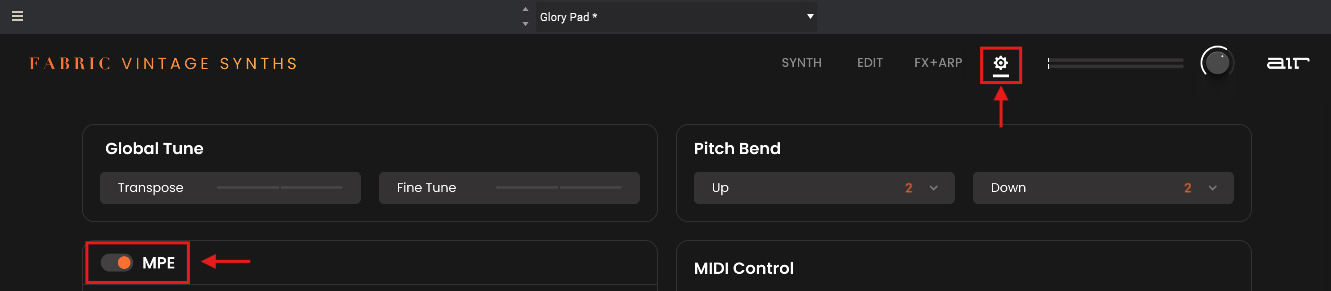
How do I enable MPE via the Fabric Vintage Synths?
To enable MPE for any of your Fabric Vintage Synths, you will need to click the Settings (Cog icon) and enable MPE
How do I enable MPE in my DAW?
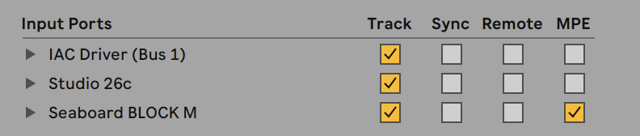
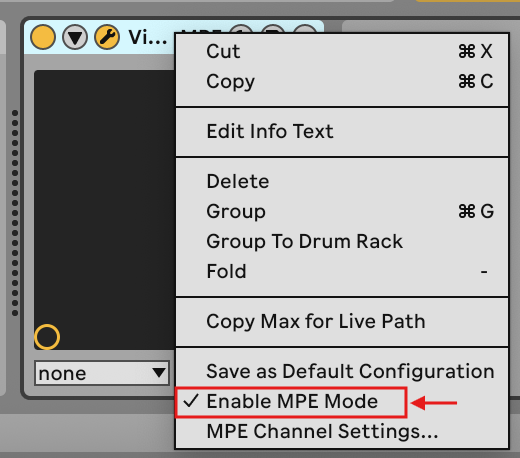
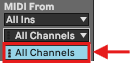
If your DAW supports MPE (MIDI Polyphonic Expression), you can enable MPE via your DAW's MIDI configuration. Below is an example of how to enable MPE in Ableton:
- Open Ableton Preferences (Ctrl + , )
- Enable MPE via the checkbox in the ‘Link, Tempo and MIDI' panel
- Right-click the Device Menu and select 'Enable MPE Mode'
- Ensure the MIDI channel for the track is set to All Channels
Please refer to your DAW's manual and support guidance for setting up and enabling MPE.
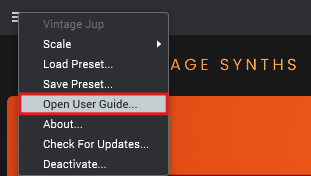
Where can I find the manual?
You can find the manual via the plug-in drop-down menu ☰
Was this article helpful?
That’s Great!
Thank you for your feedback
Sorry! We couldn't be helpful
Thank you for your feedback
Feedback sent
We appreciate your effort and will try to fix the article