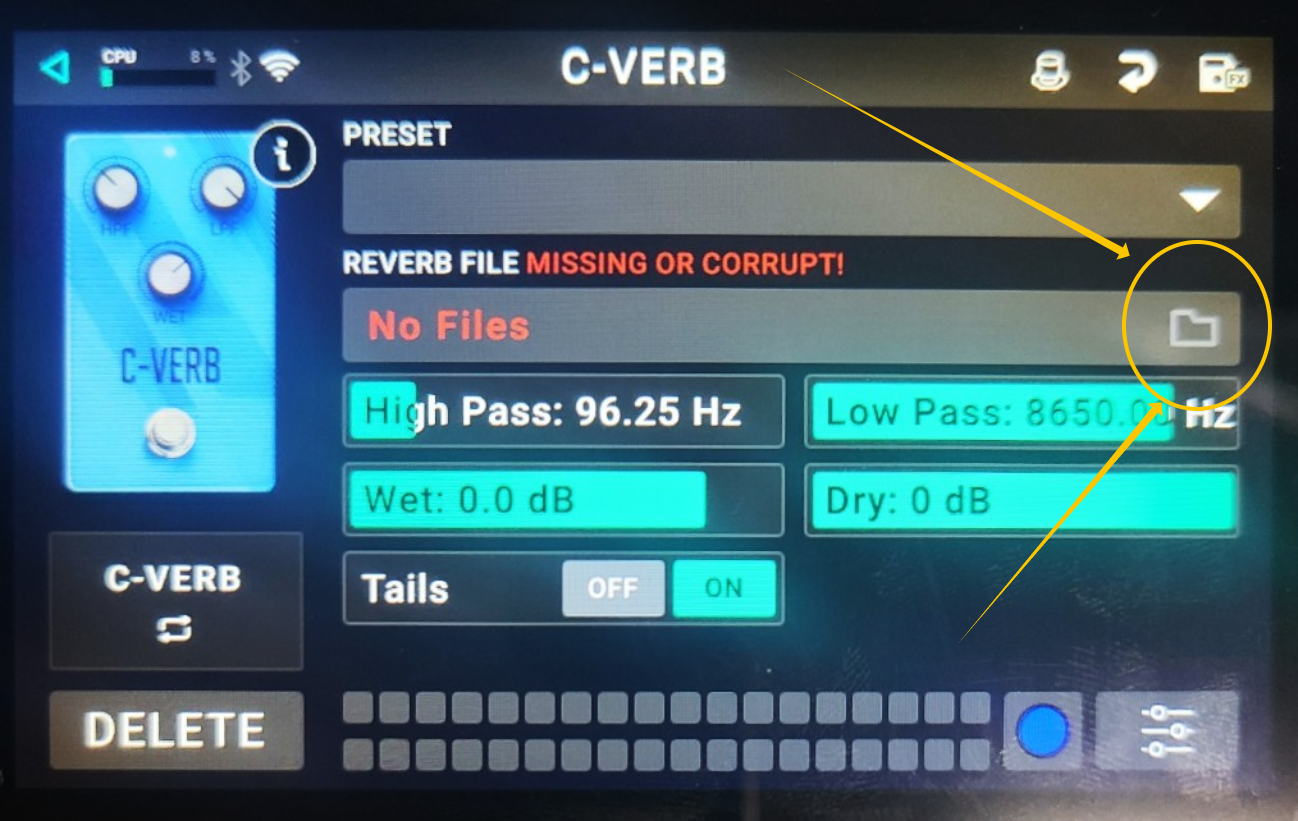
If the error message “REVERB FILE MISSING OR CORRUPT” is displayed when using the C‑Verb module, this means that no reverb Impulse Response (IR) file is currently loaded or assigned.
C‑Verb requires a valid IR file to function. If no IR has been loaded, or if it was removed, “REVERB FILE MISSING OR CORRUPT” will be displayed.
To resolve this, please follow the steps below:
1. Tap the folder icon located on the right side of the Reverb File field.
2. Go to Reverbs > Headrush > Spaces.
3. Select any available impulse response from the list.
Once an impulse response is selected, the C‑Verb effect should function normally again.
Was this article helpful?
That’s Great!
Thank you for your feedback
Sorry! We couldn't be helpful
Thank you for your feedback
Feedback sent
We appreciate your effort and will try to fix the article