How to Upgrade Komplete Select to the Komplete 15 Collectors Edition

If you already own Komplete Select and want to upgrade to the Komplete 15 Collectors Edition, we recommend the following steps:
- Log into the NI website with the same e-mail address you used to activate your NI products.
- Add Komplete 15 Standard Upgrade to your shopping cart:
https://www.native-instruments.com/pricing/komplete-15-standard/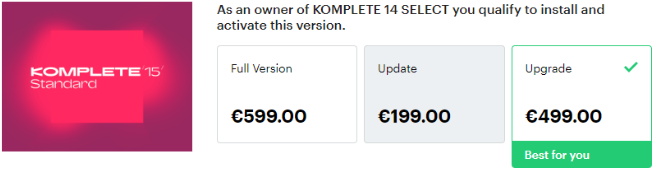
- Now, add Komplete 15 Collectors Edition Upgrade for Standard to your shopping cart:
https://www.native-instruments.com/pricing/komplete-15-collectors-edition/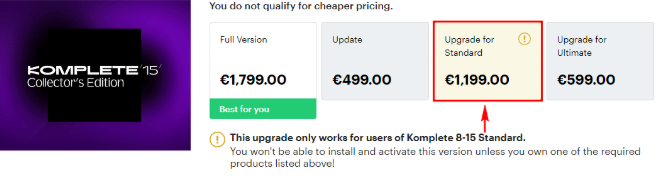
Please ignore the warning that you don't own the qualifying base product! Our webshop scans your existing registrations - and not the shopping cart!
- Proceed with your purchase.
- Once you receive your order confirmation e-mail, open the My Products and Serials area in your NI account.
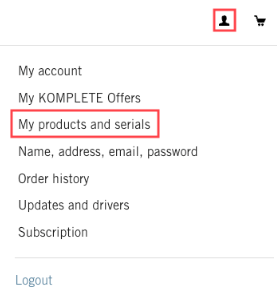
- Here you will find the Komplete bundle serial numbers.
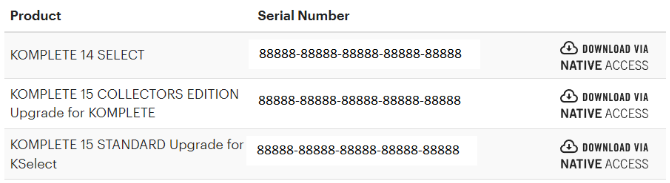
- Start Native Access to add the Komplete bundle serial numbers in successive order:
Komplete Select > Komplete 15 Standard Upgrade > Komplete 15 Collectors Edition Upgrade.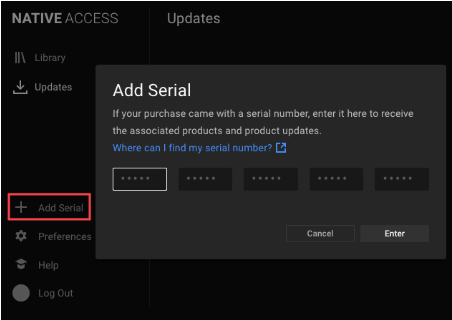
Note: If you've already registered Komplete Select, you only need to enter the Komplete 15 Standard and Collectors Edition Upgrade serials.
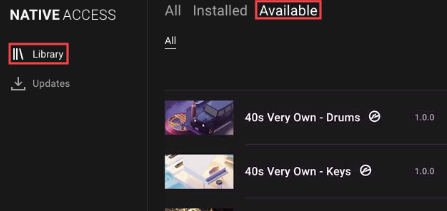
- After entering your serial numbers in Native Access, go to Library > Available to find your Komplete product downloads.
Was this article helpful?
That’s Great!
Thank you for your feedback
Sorry! We couldn't be helpful
Thank you for your feedback
Feedback sent
We appreciate your effort and will try to fix the article