TABLE OF CONTENTS
Symptom
Your NI product appears correctly installed in Native Access, but you cannot find it in your DAW.
Solutions
1. Instruments Based on Reaktor or Kontakt
Some instruments are Reaktor based or Kontakt libraries which require the Reaktor or Kontakt Player to use them.
It will be mentioned on the product page that the instrument is for use with Kontakt or Reaktor. Just scroll down to the "At a glance" section. Example:
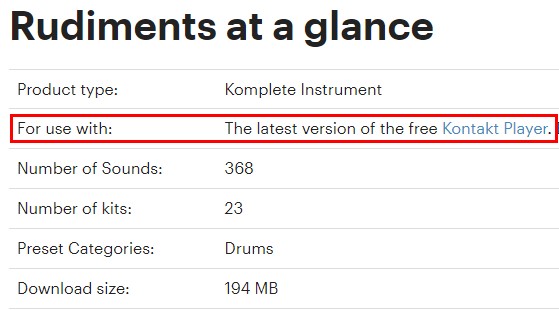
To use these instruments, you must load an instance of Reaktor or Kontakt in your DAW. From there you can load your instrument in Kontakt's or Reaktor's browser.
2. Plug-In Location
Mac
If your NI plug-in does not appear in your DAW, check the following:
On a Mac computer, audio plug-in are automatically installed to default system folders. Please make sure that those folders have been added to your DAW's plug-in manager:
- AU: Macintosh HD > Library > Audio > Plug-Ins > Components
- VST2: Macintosh HD > Library > Audio > Plug-Ins > VST
- VST3: Macintosh HD > Library > Audio > Plug-Ins > VST3
- AAX: Macintosh HD > Library > Application Support > Avid > Audio > Plug-Ins
Windows
If your NI plug-in does not appear in your DAW, make sure that your plug-in folders have been added to your DAW's plug-in manager:
- Start Native Access and go to Library > Installed.
- Select the product's Installation Paths from the three dots menu on the right.
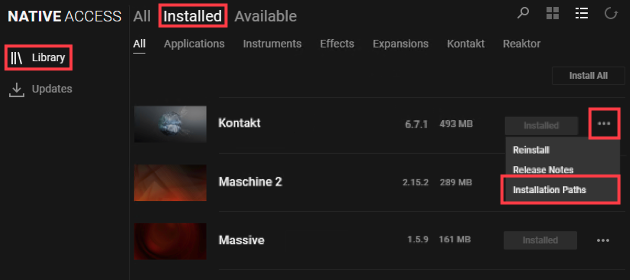
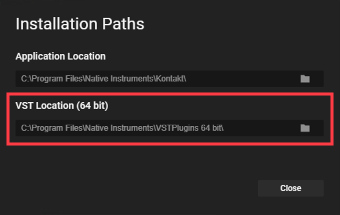
- Check the 64-bit VST location and make sure this folder has been added to your DAW's plug-in manager.
3. NI Plug-Ins in VST3 Format Only
Some NI plug-ins (e.g. Kontakt 7, Guitar Rig 7, etc.) are only available in the VST3 format. Please make sure that you use a VST3 capable DAW and to activate the VST3 option (if necessary).
4. Blocked Plug-ins
If your plug-in does not appear in your DAW, it may have been blocked by your DAW's plug-in manager. Check with your DAW's documentation on how to reactivate blocked plug-ins. The following article shows how to do this in Cubase 9.5: I Cannot Find my Native Instruments Plug-in in Cubase 9.5. Similar steps would apply to other DAWs.
Was this article helpful?
That’s Great!
Thank you for your feedback
Sorry! We couldn't be helpful
Thank you for your feedback
Feedback sent
We appreciate your effort and will try to fix the article