Native Access Error: “Your Account Is Missing the Base Product for This Serial”
If Native Access reports that your account is missing the base product, it means the upgrade, update, or crossgrade you’re installing requires a qualifying product that is not detected on your account.
TABLE OF CONTENTS
Symptom
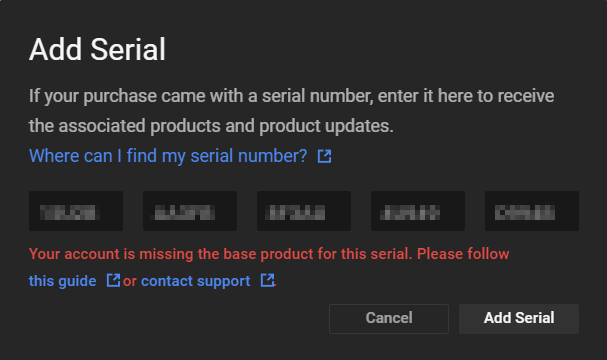
While installing an NI Crossgrade / Update / Upgrade product, the process fails and Native Access displays the following error message:
Your account is missing the base product for this serial.
Or:
Activating *Product* failed: you are missing the base product for which this upgrade/crossgrade/update is valid.

Causes
This error message may be caused by the following:
- Logging into Native Access with the wrong NI account.
- Attempting to register a Crossgrade / Update / Upgrade version without a license for its base product.
- Attempting to activate a product before the base-product license transfer is completed.
- Attempting to activate a software serial before activating the corresponding hardware product (this applies to hardware / software bundle products only).
- Attempting to install the Maschine Factory Selection, even though the full Maschine 2 Software and Maschine Factory Library are already installed.
Solutions
Checking the Native Access Login
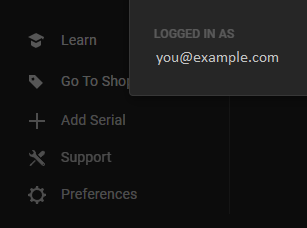
Make sure you are logged into Native Access with the same email address you previously used to register the base product.
To check which email address is used to log into Native Access, click Preferences in the lower left.
Choosing the Right Crossgrade / Update / Upgrade Option
Make sure that you purchase the correct Crossgrade / Update / Upgrade product. The purchase page on our website will indicate which pricing options are available to you. You must be logged into your account on the Native Instruments website in order for your pricing options to appear.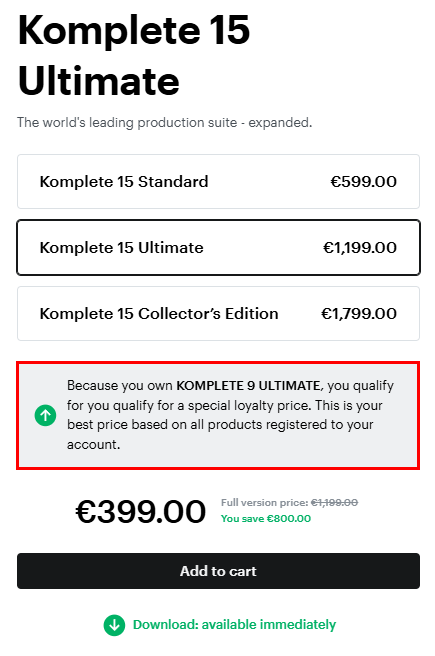
Do Not Transfer or Unregister the Base Product
Make sure the base product for your Crossgrade / Update / Upgrade is not being transferred.
For example: If you purchased a Traktor Pro 3 Update, the corresponding base product (Traktor Pro 2) cannot be transferred from your NI user account. See this article to cancel a transfer request.
Register Your NI Hardware First
If you purchased an NI hardware product, make sure you register the hardware license first, before attempting to install its bundled software. You can find the NI hardware serial number on the underside of your device or on the included registration card. Click Add Serial in Native Access to enter your NI hardware serial number.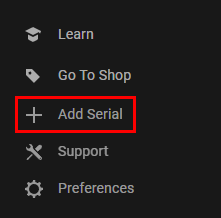
Note: it may take several minutes for your software to become available. Click the Reload button on the top right of Native Access to check for availability.
Was this article helpful?
That’s Great!
Thank you for your feedback
Sorry! We couldn't be helpful
Thank you for your feedback
Feedback sent
We appreciate your effort and will try to fix the article