TRAKTOR / SUPER 8 Appears in Demo Mode on Apple Silicon (M1)
Symptom
On Apple Silicon (M1) computers, TRAKTOR PRO 3 / SUPER 8 appear in demo mode after being installed via Native Access 2.
Solution
Our developers are working on a solution. In the meantime, please do the following:
- Downgrade to Native Access 1 (original version) as explained in this article.
- Once Native Access 1 has been installed, navigate to the following directory:
- Macintosh HD > Users > Shared
- Macintosh HD > Users > Shared
- Delete the "Native Instruments" folder.
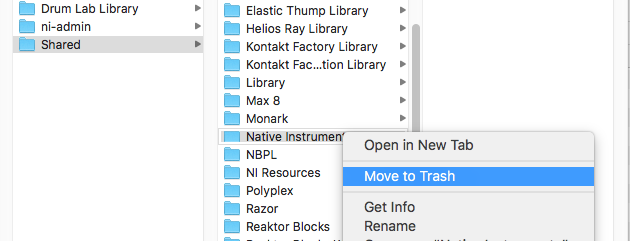
- Now, restart Native Access 1.
Now when you open TRAKTOR PRO 3 or SUPER 8, they will activate correctly.
Was this article helpful?
That’s Great!
Thank you for your feedback
Sorry! We couldn't be helpful
Thank you for your feedback
Feedback sent
We appreciate your effort and will try to fix the article