Guitar Rig FAQ | I Cannot Find GUITAR RIG 5 in Native Access
Symptom
After registering GUITAR RIG 5 (or a KOMPLETE bundle including it), it does not appear in Native Access.
Cause
There are 4 versions of GUITAR RIG 5 which all come with varying amounts of features. Native Access is currently unable to update the license from a smaller version of GUITAR RIG 5 (Player) to a higher version automatically.
Solution
Here is the list ordered hierarchically from the full version of GUITAR RIG 5 PRO with all features to GUITAR RIG 5 Factory Selection with the smallest feature set:
- GUITAR RIG 5 PRO
- GUITAR RIG 5 ELEMENTS SELECTION
- GUITAR RIG 5 LE
- GUITAR RIG 5 FACTORY SELECTION
If you register a GUITAR RIG 5 version that falls short of features in comparison to the one you already have, Native Access will not show the smaller version. This is by design.
However, if you register a higher version of GUITAR RIG (or a KOMPLETE bundle including it) and Native Access does not show it, please follow the steps:
1. Open Native Access > Installed products and scroll down to either the entry:
- Guitar Rig 5 ElementsSelection or
- Guitar Rig 5 LE or
- Guitar Rig 5 Factory Selection

2. On the right side of the entry you find the tag FULL VERSION. Hover your mouse over FULL VERSION and click REINSTALL.
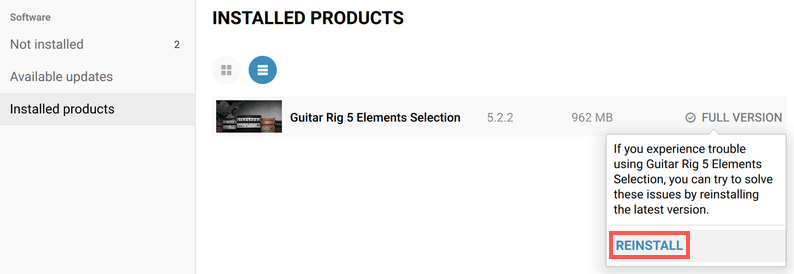
After the reinstallation process, GUITAR RIG 5 PRO shows up in Native Access as expected.

Was this article helpful?
That’s Great!
Thank you for your feedback
Sorry! We couldn't be helpful
Thank you for your feedback
Feedback sent
We appreciate your effort and will try to fix the article