Native Instruments | How to Import User Presets from Older Versions to Guitar Rig 7
In order to load a preset in Guitar Rig Pro, it is necessary to have all components installed which are used by this preset. If a component required by the preset is missing, it won't work.
A large variety of Guitar Rig Pro User Presets is available under the following LINK.
Importing User Presets from Guitar Rig 6
- Open the stand-alone version of Guitar Rig.
- Open File > Preferences:
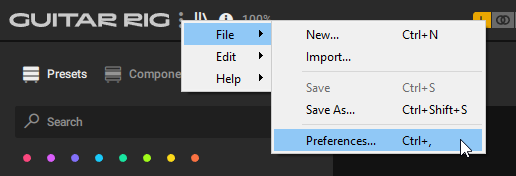
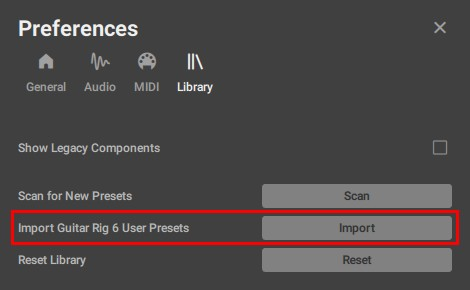
- In the Library tab, click Import:
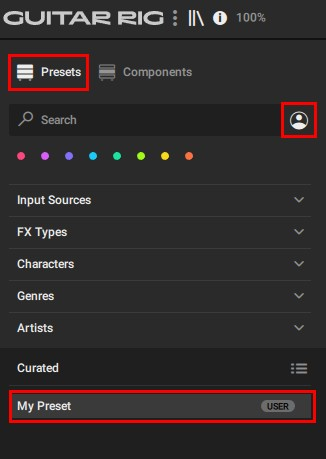
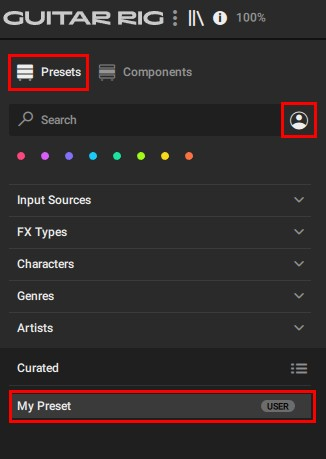
- After importing the preset, you will find it in the User Presets area of the Guitar Rig browser:
Manually importing User Presets
You can import Guitar Rig 5 and all other User Presets manually:
- Open the stand-alone version of Guitar Rig.
- Open File > Import...
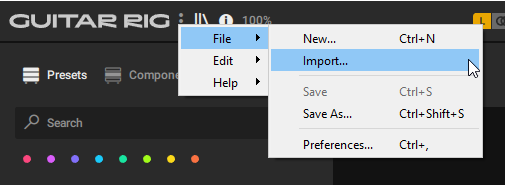
- Navigate to the folder where you stored the preset. Select it and click Open. Please note that you can only import one preset at a time.
These are the default folders for Guitar Rig User Presets:
Guitar Rig 5:
Win: C: > Users > *your username* > Documents > Native Instruments > Guitar Rig 5 > Sounds
macOS: Macintosh HD > Users > *your username* > Documents > Native Instruments > Guitar Rig 5 > Sounds
Guitar Rig 6:
Win: C: > Users > *your username* > Documents > Native Instruments > User Content > Guitar Rig 6 > Rack Presets
Mac: Macintosh HD > Users > *your username* > Documents > Native Instruments > User Content > Guitar Rig 6 > Rack Presets - After importing the preset, you will find it in the User Presets area of the Guitar Rig browser.
Was this article helpful?
That’s Great!
Thank you for your feedback
Sorry! We couldn't be helpful
Thank you for your feedback
Feedback sent
We appreciate your effort and will try to fix the article