This article provides further info and instructions on how to use the sound presets included with the Community Drive Soundpacks.
Click on the links below to find more details regarding the Community Drives, including a donation and download option:

The Community Drive Soundpack features Instrument presets for the following products:
BATTERY / MASSIVE / MONARK / PRISM / SKANNER XT / FM8 / GUITAR RIG 6 / MASSIVE X
Note: It is required to have the above-listed products installed and activated for the Community Drive presets to be used. A demo version for each product is also available.
Loading Community Drive Soundpack Presets in Komplete Kontrol and Maschine 2
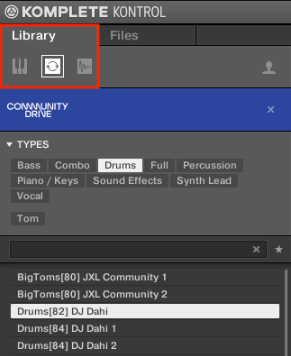
The Community Drive presets are available in the KOMPLETE KONTROL software within the Instruments, Loops, and One-Shots sections of the Browser.
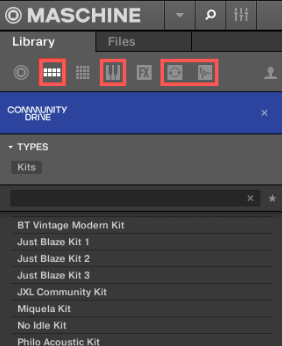
The MASCHINE 2 browser features MASCHINE Groups (Kits), in addition to the same Community Drive presets (Instruments, Loops, and One-Shots).
Loading Community Drive Soundpack Presets in Individual NI Products
In addition to KOMPLETE KONTROL and MASCHINE 2, the Community Drive presets may also be loaded in their respective software instrument applications.
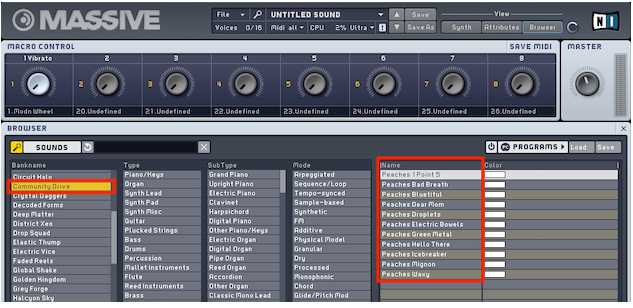
Community Drive presets can be opened separately into these software instrument applications (standalone and plug-in):
- BATTERY 4
- FM8
- GUITAR RIG 6
- MASSIVE
- MASSIVE X
- REAKTOR 6 (FULL & PLAYER)
For example, the MONARK, PRISM, and SKANNER XT content can be opened in the REAKTOR 6 (PLAYER) software.
After the installation of Community Drive, you will find the presets in the respective product's preset browser. The presets of MASSIVE X and GUITAR RIG 6 have to be copied to their user Content folders.
Loading Community Drive Soundpack Presets in MASSIVE X
The MASSIVE X presets have to be copied to your User Content folder. The Community Drive folder is installed to the Content Location you set in Native Access Preferences. The default locations are:
- Mac OS: Macintosh HD > Users > Shared > Community Drive Library
- Windows: C: > Users > Public > Public Documents > Community Drive
Open that folder and go to Sounds > Massive X. Copy the folder WIZE to your clipboard. Then, go to the MASSIVE X User Content folder. It is located at:
- Mac OS: Macintosh HD > Users > *Username* > Documents > Native Instruments > User Content > Massive X > Presets
- Windows: C: > Users > *Username* > Documents > Native Instruments > User Content > Massive X > Presets
Paste the copied WIZE folder into the Presets folder. Start MASSIVE X in your DAW. Now, you can access the new presets from your User Presets browser.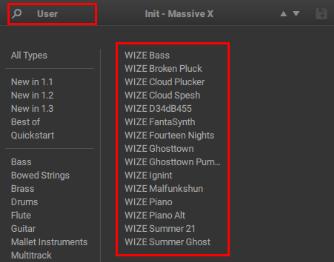
Loading Community Drive Soundpack Presets in GUITAR RIG 6
The GUITAR RIG 6 presets have to be copied to your User Content folder. The Community Drive folder is installed to the Content Location you set in Native Access Preferences. The default locations are:
- Mac OS: Macintosh HD > Users > Shared > Community Drive Library
- Windows: C: > Users > Public > Public Documents > Community Drive
Open that folder and go to Sounds > Guitar Rig Presets. Copy both folders Jamie Lidell and Phase Fatale to your clipboard. Then, go to the GTR6 User Content folder. It is located at:
- Mac OS: Macintosh HD > Users > *Username* > Documents > Native Instruments > User Content > Guitar Rig 6 > Rack Presets
- Windows: C: > Users > *Username* > Documents > Native Instruments > User Content > Guitar Rig 6 > Rack Presets
Paste the two copied folders into the Rack Presets folder. Start GUITAR RIG 6 and open Preferences > Library. Hit the Scan button. Now, you can access the new presets from your User Presets browser.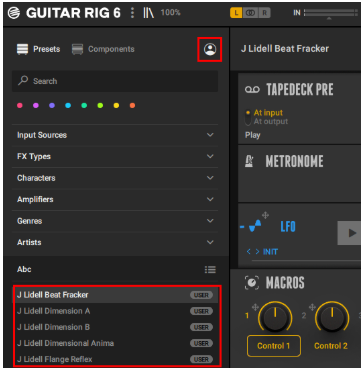
Note: the presets will now also appear when you're loading GTR6 in KOMPLETE KONTROL / MASCHINE 2.
Accessing the Loops and Samples
The Community Drive's artist samples and loops will automatically show up in your KOMPLETE KONTROL and MASCHINE Software. But you can use these WAV-files freely in every other audio software / DAW as well. The Community Drive folder is installed to the Content Location you set in Native Access Preferences. The default locations are:
- Mac OS: Macintosh HD > Users > Shared > Community Drive Library
- Windows: C: > Users > Public > Public Documents > Community Drive
The artist samples and loops are located in the Samples folder.
Accessing the Ableton Kits
Access these Ableton kits directly in your computer's file-system. The Community Drive folder is installed to the Content Location you set in Native Access Preferences. The default locations are:
- Mac: Macintosh HD > Users > Shared > Community Drive Library
- Windows: C: > Users > Public > Public Documents > Community Drive
The Ableton Kits are found within the Sounds folder.
For more details and instructions to insert the Ableton Kits please follow the PDF Guide provided within the Ableton Kits folder.
Accessing the Logic Drum Machine Kits
Access these Logic / Drum Machine Designer kits directly in your computer's file-system. The Community Drive folder is installed to the Content Location you set in Native Access Preferences. The default locations are:
- Mac OS: Macintosh HD > Users > Shared > Community Drive Library
- Windows: C: > Users > Public > Public Documents > Community Drive
The Logic / Drum Machine Designer Kits are found within the Sounds folder.
Was this article helpful?
That’s Great!
Thank you for your feedback
Sorry! We couldn't be helpful
Thank you for your feedback
Feedback sent
We appreciate your effort and will try to fix the article