MASCHINE+: Setting Up MIDI Presets to Control External Hardware Instruments
As with the MASCHINE 2 software, MASCHINE+ includes MIDI CC features to enable you to control your MIDI hardware instruments (e.g. synthesizer, drum machine) as if they were plug-ins.
This article explains how to access and use the library of MIDI presets for popular devices in MASCHINE+.
Additionally, this article explains how to route the external device's audio output back to a Sound slot in MASCHINE+. This further allows the use of MASCHINE+ effects and manipulation of the recorded audio within the MASCHINE+ sampler.
Accessing the MIDI Presets from the MASCHINE+ Browser
The MIDI Presets are found directly in the MASCHINE+ Browser.
- Press the BROWSER button.
- Choose Groups or Sounds.
- Choose Groups to control a hardware drum machine with multiple MASCHINE+ pads.
- Choose Sounds to control a hardware synthesizer, hardware effects unit, or one particular sound of a drum machine (on a single pad). - Turn Knob 2 to select Maschine.
- Turn Knob 5 to select MIDI Ext. This displays a list of presets made to control a hardware drum machine or synthesizer.
Note: Sub-Types may also be selected within the browser menus, to narrow the list down to instrument type and manufacturer.
- Press Button 8 (LOAD) to load a MIDI Preset from the list.
Sending MIDI Out from MASCHINE+ to your Hardware Device
- Press the CHANNEL button.
- Press Button 3 (SOUND).
- Use Buttons 5 / 6 to select OUTPUT.
- Use the Page Buttons (Left / Right) to enter the MIDI control page.
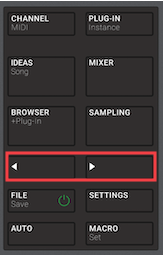
- Set MIDI destination (DEST.) to the desired MIDI out port. In our example, we choose Maschine Plus MIDI 1 (Output).
Note: The available MIDI outputs correspond with the settings defined in MASCHINE+ SETTINGS > MIDI > Output Devices.
- Select the same MIDI channel that your external synthesizer receives MIDI data on. This is usually MIDI channel 1.
- Press the MACRO button to access the adjustable parameters for your synthesizer.
MASCHINE+ is now set up to play and control the external synthesizer or drum machine.
Routing Audio from the External Device Back to MASCHINE+
Select a Sound/Pad slot to route the external synthesizer's audio back into MASCHINE+.
Note: If you are using a Group MIDI preset (e.g. when all 16 Sound slots are already used in the Group), it is required to choose a Sound slot within a different Group.
- Press the CHANNEL Button.
- Press Button 3 (SOUND).
- Use Button 5 / 6 to select INPUT.
- Use the Page Buttons (Left / Right) to enter the Audio control page.
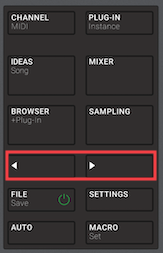
Set the Audio SOURCE to the desired audio input port. In our example, we choose In 1 L+R, since the external synthesizer's audio cables are connected to the MASCHINE+ LINE IN 1 & 2 ports.
- Adjust the Input GAIN if needed.
While playing the connected hardware instrument, its audio is routed through the new MASCHINE+ Sound slot that has been dedicated to receiving the instrument's audio signal.
Saving the Group / Sound Settings
To avoid repeating the above steps every time you want to use your hardware synthesizer with MASCHINE+, a Group / Sound preset containing these settings can be saved as follows:
- Press FILE (Save), and press Button 3 (SAVE AS).
- Use Knob 1 to set the FileType to Group (or Sounds).
Note: Use Knob 2 (SELECTED) to choose the Group / Sound that you intend to save. - Press Button 8 (SAVE AS).
- Use the 4-D Encoder to re-name your preset and press Button 8 (ENTER) to confirm.
The Group / Sound preset file is saved to the MASCHINE+ SD Card, in its Standard User Directory.- SD CARD > Native Instruments > Maschine 2 > Groups (or Sounds)
Reloading the Saved Group / Sound
- Press the BROWSER button.
- Choose Groups (or Sounds).
- Press Button 4 (USER).
- Turn Knob 2 to select Maschine.
- Turn Knob 8 to select the preset that you created.
- Press Button 8 (LOAD) to load the preset.
Was this article helpful?
That’s Great!
Thank you for your feedback
Sorry! We couldn't be helpful
Thank you for your feedback
Feedback sent
We appreciate your effort and will try to fix the article