On Mac systems, hard drives can be formatted in a variety of ways. If a hard drive is formatted 'case-sensitive', the system distinguishes between uppercase and lowercase letters that are used for volume and folder names.
Important Note: Native Instruments products are not compatible with Case-sensitive hard drives.
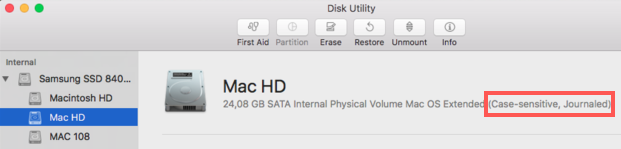
To find out if you are using a case-sensitive hard drive, follow these steps:
- Open Disk Utility from Mac HD > Applications > Utilities.
- Choose the hard drive volume that you want to verify from the list on the left hand side of the window.
- The description shows if the selected hard drive's format is Case-sensitive:
Make sure to only use hard drives that are not formatted case-sensitive for installing and using NI products on Mac computers.
For best results, your external drive should be formatted the same as your operating system's native format.
- On macOS 10.12 Sierra (and earlier versions of OS X), the standard HFS+ / Mac OS Extended (Journaled) format is recommended.
- On macOS 10.13 High Sierra and later, the Apple File System (APFS) format is recommended.
Note: See this article from Apple Support to learn how to reformat a storage drive on macOS.
Was this article helpful?
That’s Great!
Thank you for your feedback
Sorry! We couldn't be helpful
Thank you for your feedback
Feedback sent
We appreciate your effort and will try to fix the article