How to Uninstall Native Instruments Software from a Windows Computer
You can uninstall all products from Windows Settings > Apps. For content products (like Kontakt libraries, Expansions, etc.) we recommend using the uninstall function in Native Access. Here are more details:
Uninstalling via the Windows Settings:
- Click the Windows Start Button > Settings > Apps > Apps & features.
- Find the app you want to remove, highlight it and select More > Uninstall.
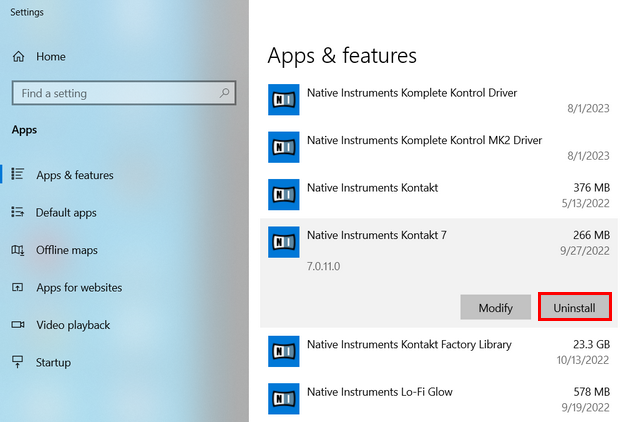
Native Instruments products can be found under "Native Instruments *product name*".
Most iZotope products can be found under "iZotope *product name*". If you cannot find it in the list, please search for the product name only. - IMPORTANT: If you are using Native Access 3.10.3 (or higher), please also delete the following file:
C:> Users > Public > Public Documents > Native Instruments > installed_products > *Product Name*.json
Uninstalling content products in Native Access:
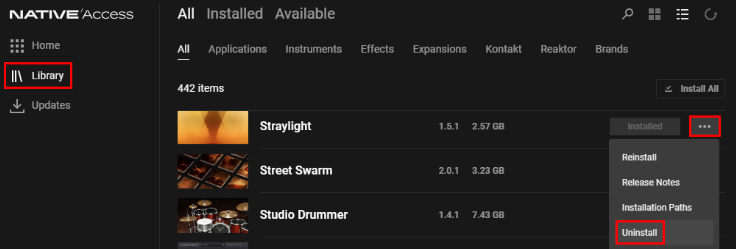
With Native Access 3.6 (and higher), content products (like Kontakt libraries, Expansions, etc.) can be uninstalled directly from the Library tab. Click the 3 dots on the right-hand side of the product entry and select Uninstall.
Was this article helpful?
That’s Great!
Thank you for your feedback
Sorry! We couldn't be helpful
Thank you for your feedback
Feedback sent
We appreciate your effort and will try to fix the article