When installing a major Native Instruments update (e.g., upgrading from one full version to another), the new version is installed alongside the existing version rather than replacing it.
TABLE OF CONTENTS
- How Major Updates Work
- Should I keep the older plug-in version on my computer?
- Can I transfer my edited presets to the new plug-in version?
How Major Updates Work
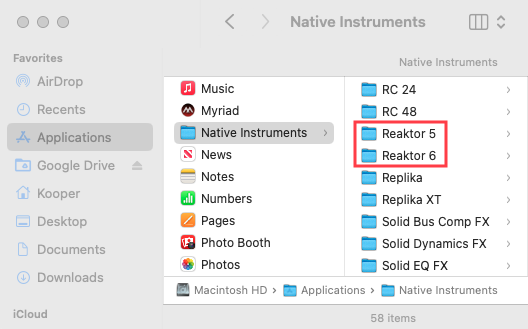
When installing a major NI product update to your computer (e.g. updating from REAKTOR 5 to REAKTOR 6), the new version of the software will not overwrite the previous one. Both versions are installed side-by-side in your Native Instruments Application and Plug-in folders.
Note: This applies only to paid updates (e.g. from version 5 to version 6). Incremental updates (e.g. version 6.1, 6.2, 6.3, etc.) are free. Please see this article for more details on free vs. paid updates.
Should I keep the older plug-in version on my computer?
If you are still working on existing DAW projects that used the older version of the plug-in, you would need to keep that previous version of the NI product installed.
If the older version (e.g. REAKTOR 5) is uninstalled, your DAW will report that the older plug-in is missing the next time the project opens.
Can I transfer my edited presets to the new plug-in version?
You can save your sound and replace the older plug-in with the new version (e.g. REAKTOR 6) in your DAW project. Please see this article for a tutorial guide.
When is it safe to uninstall the old version of the plug-in?
Once you have replaced the older plug-in version in all of your DAW projects that used it, you could then remove the old version from your computer.
Was this article helpful?
That’s Great!
Thank you for your feedback
Sorry! We couldn't be helpful
Thank you for your feedback
Feedback sent
We appreciate your effort and will try to fix the article