KOMPLETE 1–7 Installer Error: “Installation cannot proceed” (Mac)
If you receive a “Failure. Installation cannot proceed” error when installing older KOMPLETE versions on macOS, it is typically related to system compatibility or installer limitations.
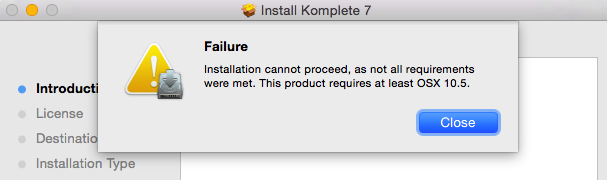
TABLE OF CONTENTS
- macOS compatibility
- Use Native Access when possible
- Run installer with proper permissions
- Try an earlier macOS version (if applicable)
- Update to Komplete 14
If your installation fails with this error, check the following:
macOS compatibility
Older KOMPLETE versions (1–7) may not be compatible with newer macOS versions. This can prevent the installer from completing.
Use Native Access when possible
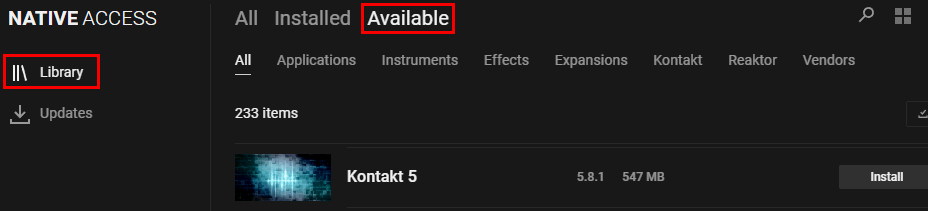
If your product supports Native Access, install it from there instead of using the legacy installer.
Download and install Native Access 2 from our website. Once you logged in with your email address and password, you can find the available products in Library > Available:
Run installer with proper permissions
Make sure you have administrator access and that macOS security settings are not blocking the installer.
Try an earlier macOS version (if applicable)
These legacy installers were designed for older systems and may not run on newer macOS releases.
Update to Komplete 14
You can update your legacy version of KOMPLETE to KOMPLETE 14. Here is a list of all the included KOMPLETE 14 products.
Was this article helpful?
That’s Great!
Thank you for your feedback
Sorry! We couldn't be helpful
Thank you for your feedback
Feedback sent
We appreciate your effort and will try to fix the article