Maschine | iZotope Neutron 4 Does Not Appear in KOMPLETE KONTROL or MASCHINE
TABLE OF CONTENTS
Symptom
iZotope Neutron 4 is not available in the KOMPLETE KONTROL or MASCHINE presets browser.
Cause
The Neutron 4 presets are not yet available in the NI NKS preset format.
Solutions
The Neutron 4 VST3 plug-ins can be loaded directly in the KOMPLETE KONTROL and MASCHINE FX plug-in menus. Please follow these steps for KOMPLETE KONTROL and MASCHINE.
KOMPLETE KONTROL
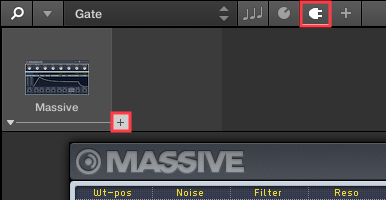
- After loading an instrument preset in KOMPLETE KONTROL, select the Plug-in icon in the header and click the "+" icon to the right of the instrument slot.
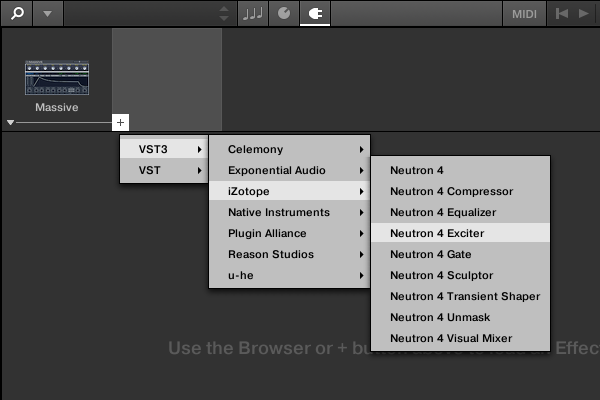
- Select VST3 > iZotope and choose a Neutron 4 plug-in.
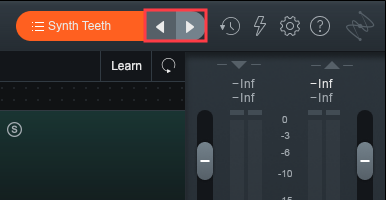
- Use the Neutron GUI to load a preset.
MASCHINE
- After loading an instrument preset in MASCHINE, click the Plug-in icon and select *SOUND.
- Click the "+" icon to access the FX plug-in menu.
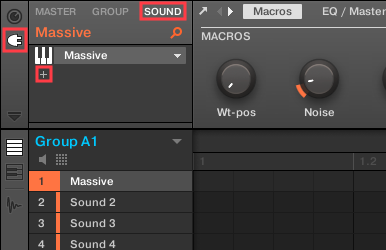
*Note: Effects plug-ins can also be applied to the MASCHINE GROUP and MASTER channels.
- Select VST3 > iZotope and choose a Neutron 4 plug-in.
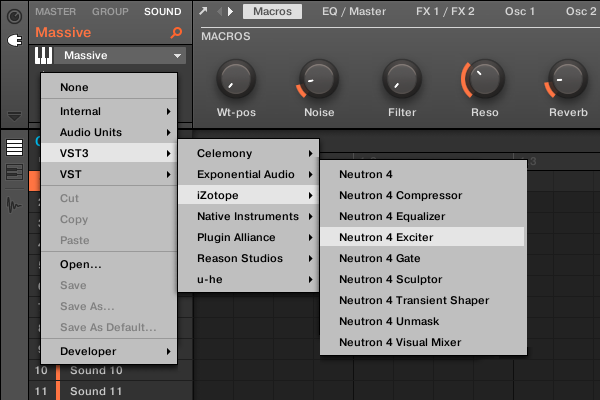
Note: macOS users can also load Neutron 4 from the Audio Units > iZotope menu.
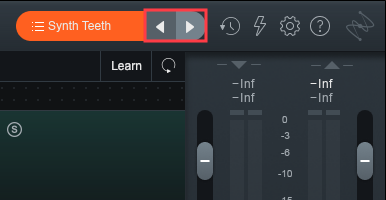
- Use the Neutron GUI to load a preset.
Was this article helpful?
That’s Great!
Thank you for your feedback
Sorry! We couldn't be helpful
Thank you for your feedback
Feedback sent
We appreciate your effort and will try to fix the article