MASCHINE 2 Does Not Receive an Audio Signal with macOS 10.14 (or higher)
Symptom
MASCHINE 2 is not receiving an audio signal with macOS 10.14 (or higher).
Cause
MacOS 10.14 (and higher versions) requires you to confirm permission for any application which can access the audio inputs of your computer.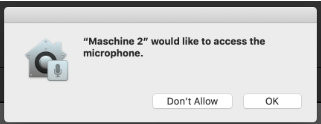
Solution
Adjust your Mac settings to enable the audio inputs:
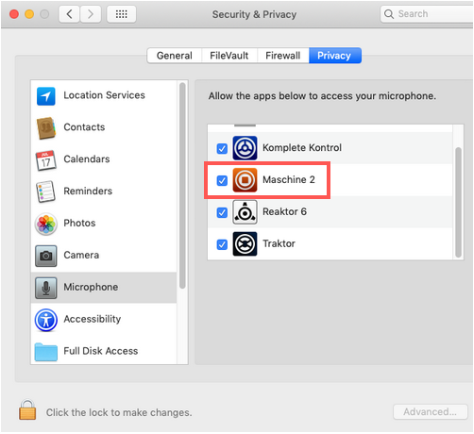
- Go to System Preferences > Security & Privacy > Privacy > Microphone
- Click on the lock icon next to Click the lock to make changes and enter your computer log-in details.
- Enable the microphone setting for your app(s) by ticking the corresponding box(es). In the below example, we are enabling the microphone access for Maschine 2.
Was this article helpful?
That’s Great!
Thank you for your feedback
Sorry! We couldn't be helpful
Thank you for your feedback
Feedback sent
We appreciate your effort and will try to fix the article