How Can I Adjust the Master Tempo of MASCHINE 2 Using the MASCHINE STUDIO Controller?
To adjust the Master tempo of MASCHINE 2.0 using the MASCHINE Studio Controller follow the instructions below:
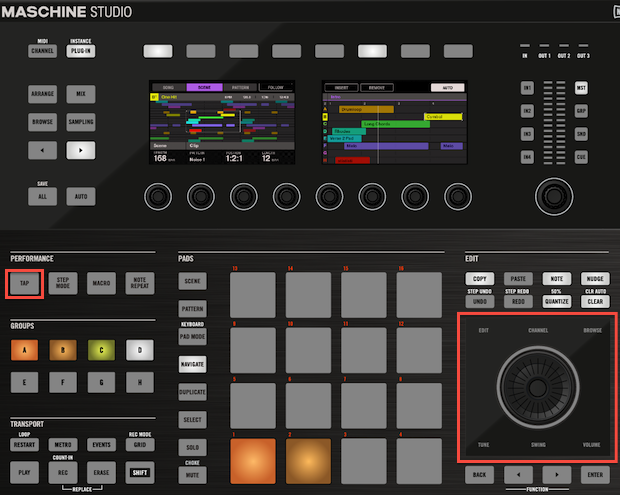
- Press and hold down the Tap button of the MASCHINE Studio controller. While the Tap button is pressed down, the jog wheel will light up.
- Turn the Jog Wheel clockwise to increase the Master Tempo or or counter-clockwise to decrease the Master Tempo.
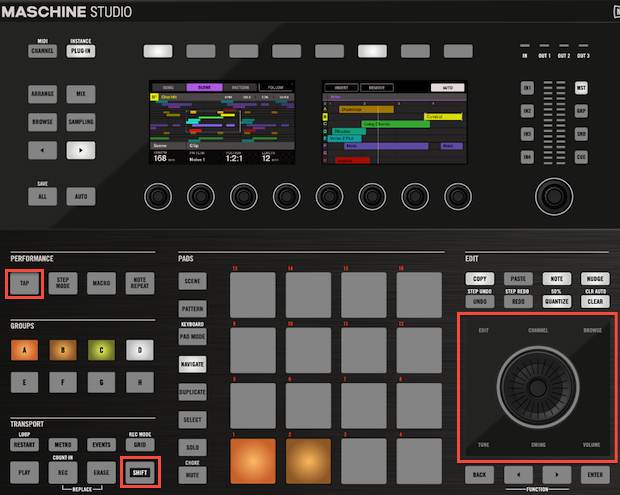
- To make fine tempo adjustments press the Tap as well as the Shift buttons and turn the Jog Wheel of the MASCHINE Studio Controller.
Was this article helpful?
That’s Great!
Thank you for your feedback
Sorry! We couldn't be helpful
Thank you for your feedback
Feedback sent
We appreciate your effort and will try to fix the article