TABLE OF CONTENTS
The Komplete Kontrol Browser gives quick access to all sounds and libraries that are available in NKS format. This applies to sounds from Native Instruments as well as third-party NKS Partners.
Third-party sounds that are not NKS-ready will not appear in the Komplete Kontrol Browser. In this article, we explain how to load third-party plug-ins which are not in NKS format.
Loading a Non-NKS Instrument
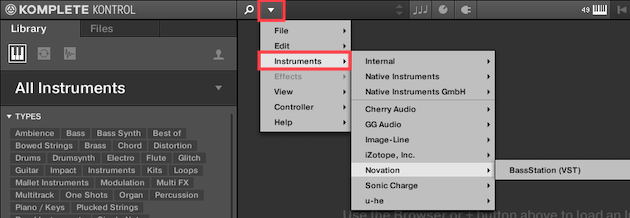
Non-NKS plug-ins are available to load into Komplete Kontrol. As long as they're in 64-bit VST format, they can be loaded.
- Open the Komplete Kontrol software menu.
- Go to Instruments to find and select any third-party Instruments you may find here.
Loading Non-NKS Effects
In addition to Instrument plug-ins, you can also load non-NKS Effect plug-ins. As long as they're in 64-bit VST format, they can be loaded.
- Click the Plug symbol at the top of Komplete Kontrol. A box representing the currently loaded Instrument will appear below.
- Click the small plus (+) sign, and select any third-party Effects you may find here.
Note: An Instrument plug-in must be loaded first before any Effects plug-ins can be browsed this way.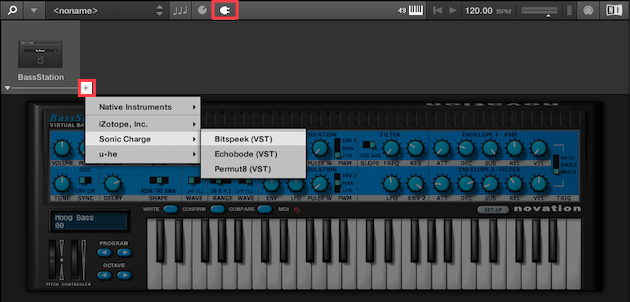
Note: If you're on Windows and your third-party plug-ins are not available, please follow this tutorial to add them to Komplete Kontrol.
Was this article helpful?
That’s Great!
Thank you for your feedback
Sorry! We couldn't be helpful
Thank you for your feedback
Feedback sent
We appreciate your effort and will try to fix the article