I Hear a Sound When Pressing the Transport Control Buttons on my KOMPLETE KONTROL Keyboard
Symptom
There is an unexpected sound in your DAW when pressing the transport control buttons (PLAY, REC, STOP, etc.) on your KOMPLETE KONTROL keyboard.
Cause
This occurs when the dedicated MIDI-port for DAW control is activated as a general MIDI-input in your DAW. This causes the control data sent from the transport control buttons to trigger any record-armed MIDI track.
Solution
Make sure that the Input MIDI-port named Komplete Kontrol DAW is not activated as a general MIDI-input in your DAW. This will prevent the control data from being sent to your midi tracks and instruments. The example below shows this setting in FL Studio under OPTIONS > MIDI settings > MIDI: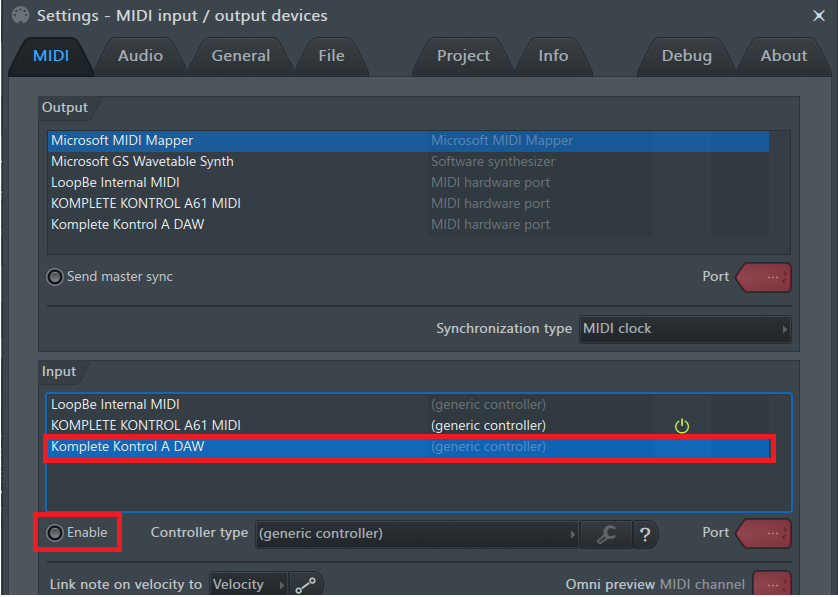
Note: Don't deactivate the other KOMPLETE KONTROL MIDI-ports. These are used for the MIDI data being sent from the keybed and the hardware MIDI-input of the keyboard.
If you wish to use the transport controls of your keyboard in your DAW, please check the manual for instructions on how to set this up.
If you are using a DAW that does not support KOMPLETE KONTROL's advanced integration, you will need to enable KOMPLETE KONTROL DAW as an MCU controller (Mackie Control Universal), rather than a general / generic MIDI-input:
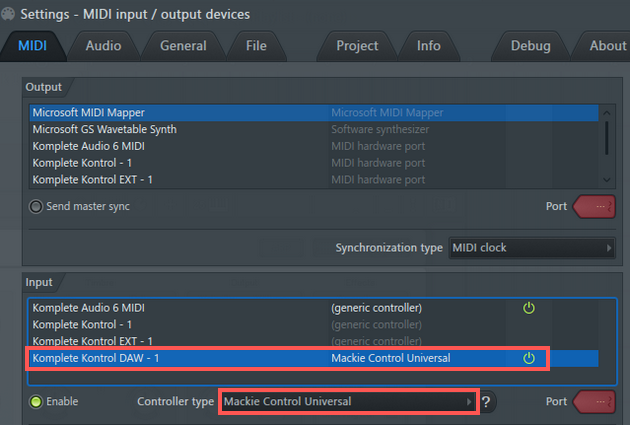
After completing the setup and correcting your MIDI routing, the transport control buttons on your KOMPLETE KONTROL keyboard will work as expected.
Was this article helpful?
That’s Great!
Thank you for your feedback
Sorry! We couldn't be helpful
Thank you for your feedback
Feedback sent
We appreciate your effort and will try to fix the article