This guide explains how to load instruments and effects in Reaktor.
You’ll learn how to open ensembles in standalone mode or load Reaktor as a plug-in within your DAW.
Using the Player Browser
- Open the Reaktor software in standalone mode or as a plug-in in your DAW. The standalone application is installed in this location:
Mac: Macintosh HD > Applications > Native Instruments > Reaktor 6
Windows: C: > Program Files > Native Instruments > Reaktor 6 - Click the Play column on the Start Screen.
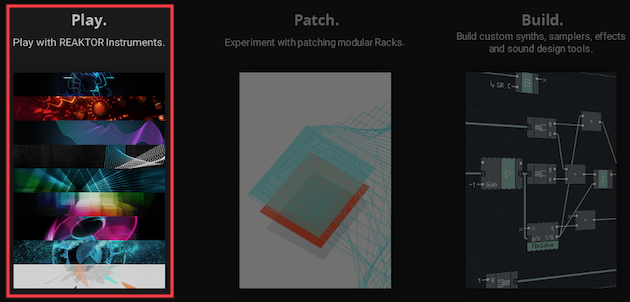
Note: If the Start Screen does not appear, the browser is automatically available. The Start Screen can be enabled in Reaktor Preferences > General > On startup.
- The Player browser displays all Reaktor instruments and effects that are installed.
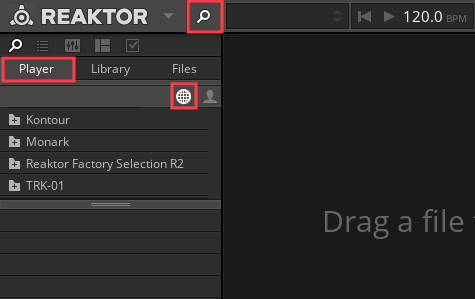
Note: Click the magnifying symbol if the Player browser does not appear.
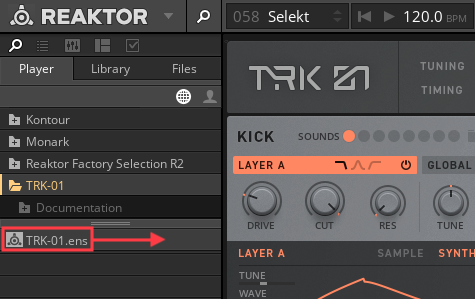
- Scroll through the upper section of the Player browser to select a Reaktor instrument or effect. Clicking the plus (+) icon expands the folder and shows the instrument file. In this example this is TRK-01.ens.
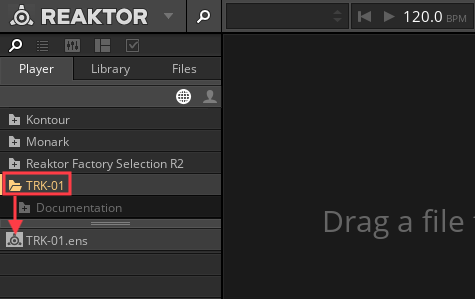
- Double click the Reaktor instrument file to open it. Alternatively, the instrument file can be dragged to the right.
Was this article helpful?
That’s Great!
Thank you for your feedback
Sorry! We couldn't be helpful
Thank you for your feedback
Feedback sent
We appreciate your effort and will try to fix the article