Battery 4 is compatible with several third-party file formats including Apple Loops, EXS24, Gigastudio, Recycle, and others. For a full list of all Battery 4 compatible file formats, please refer to the System Requirements page.
This article will explain how to load a Recycle (.rx2) instrument into Battery. The same process applies to all other Battery-compatible file formats.
- Open Battery 4 in standalone mode or as a plug-in within your DAW.
- Click on the Files tab of the Battery 4 Browser.
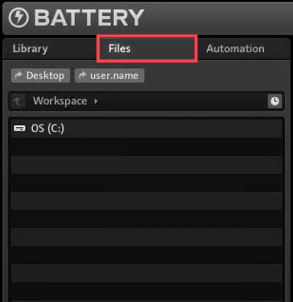
- The Files section displays your computer’s hard drives and files in a familiar tree structure. Navigate to the directory containing your Recycle file (.rx2). In this example, the folder is named My Samples and contains the Recycle file "Kick[90] Squared.rx2".
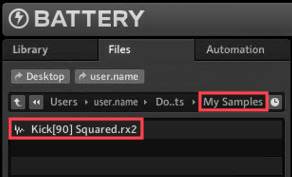
To load the instrument and its respective samples, either drag and drop the file to a free cell or double-click it.
Was this article helpful?
That’s Great!
Thank you for your feedback
Sorry! We couldn't be helpful
Thank you for your feedback
Feedback sent
We appreciate your effort and will try to fix the article