How to Move NI Legacy Libraries to Another Location on the Computer
If you have moved your Native Instruments libraries after the original installation, you will have to relocate them within the software. This article explains how to relocate the libraries of the following NI legacy products:
TABLE OF CONTENTS
1. KONTAKT 2 - 4
After moving the KONTAKT Factory Library of older versions of KONTAKT (2-4), you can set the new library path in the Options under Load / Import.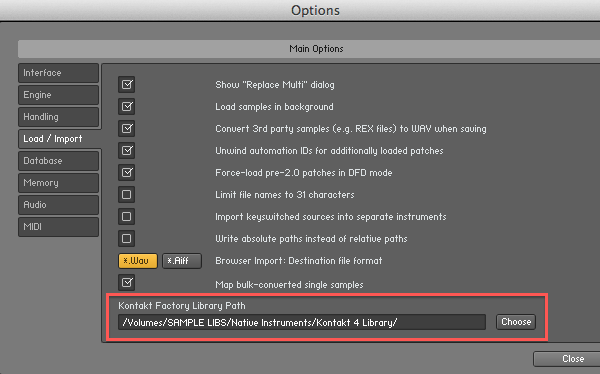
2. MASCHINE
MASCHINE-based content is typically installed and managed through Native Access or within the MASCHINE software environment.
3. BATTERY 3
Third-party sample formats can also be imported in BATTERY 3 using similar methods, such as drag and drop or the file browser.
4. AKOUSTIK PIANO
Follow these instructions to relocate your AKOUSTIK PIANO Library:
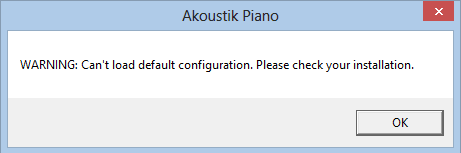
- Open AKOUSTIK PIANO after moving the library folder. You will receive the following warning. Click OK.
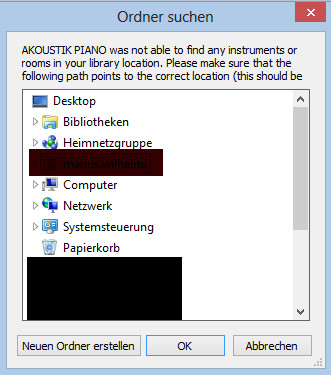
- A new Explorer window opens. Browse to the new library location and click OK.
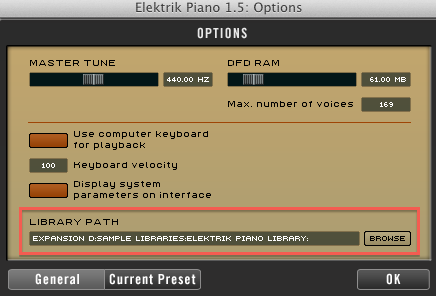
5. ELEKTRIK PIANO
Follow these instructions to relocate your ELEKTRIK PIANO Library:
- Open the OPTIONS menu.
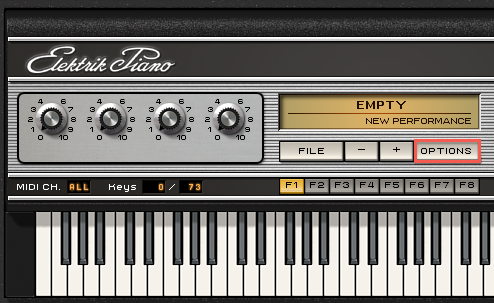
- Click BROWSE to reset the Library path, then click OK.
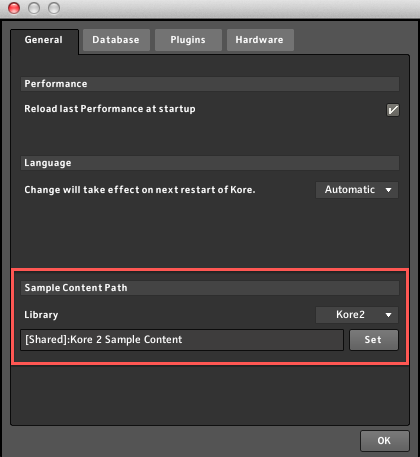
6. KORE 2 and KORE 2 PLAYER
Follow these instructions to relocate your KORE 2 or KORE 2 Player Sample Content:
- Open the Preferences and go to the General tab.
- Click Set under Sample Content Path to reset the directory.
Was this article helpful?
That’s Great!
Thank you for your feedback
Sorry! We couldn't be helpful
Thank you for your feedback
Feedback sent
We appreciate your effort and will try to fix the article