In some cases, you may wish to stop the playback of one sample (e.g. open hi-hat) by triggering another sample (e.g. closed hi-hat). This technique is commonly referred to as "hi-hat choking", and is meant to simulate the behavior of a real hi-hat on a physical drum kit.
Follow these instructions to configure a group of Battery 4 Cells for this kind of sample triggering.
- Load a Closed Hi-Hat sample into one Cell.
- Load an Open Hi-Hat sample into another Cell.
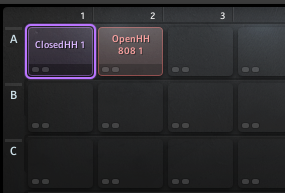
- Select the Cell containing the Closed Hi-Hat and go to the Setup tab.

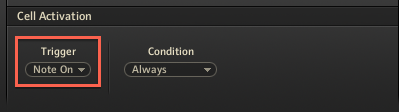
- In the Cell Activation section, make sure the Trigger parameter is set to Note On.
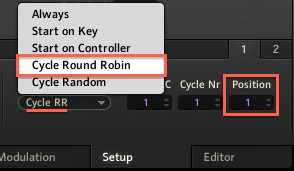
- Set the Condition parameter to Cycle Round Robin, and set the Position parameter to 1.
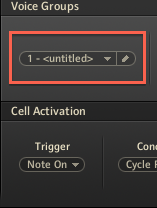
- In the Voice Groups section, assign both cells to a new voice group (e.g. 1 - <untitled>).
Note: Both Cells must be assigned to the same new Voice Group. You have the option to name the new voice group.
- Set the Voices number to 1.
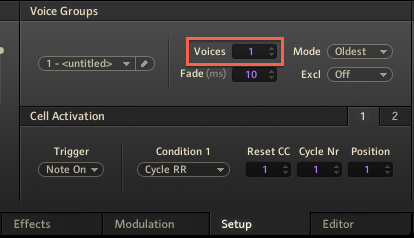
Now, alternate the playback of these Cells containing the Open and Closed Hi-Hat. The sound from the Closed Hi-Hat Cell will now interrupt the sound of the Open Hi-Hat Cell.
Was this article helpful?
That’s Great!
Thank you for your feedback
Sorry! We couldn't be helpful
Thank you for your feedback
Feedback sent
We appreciate your effort and will try to fix the article