Native Instruments | I Cannot Relocate Missing Samples in Battery
Symptom
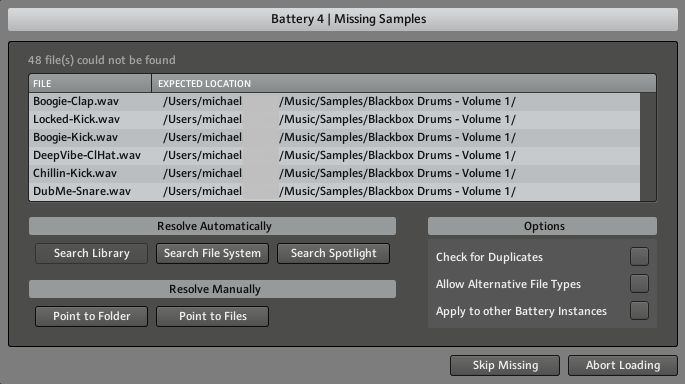
When opening a DAW project containing a Battery 4 track, a 'Missing Samples' dialogue appears. After relocating the samples and reopening the Battery window, the samples are gone again.
Solution
In this example, we are using Logic Pro. However, the same instructions also apply to all other DAWs.
1. Open your DAW session.
2. When the Missing Samples dialog appears, point to the folder containing the samples / kits or search the File System.
3. Click Battery's drop-down Main menu and select File > Save Kit As...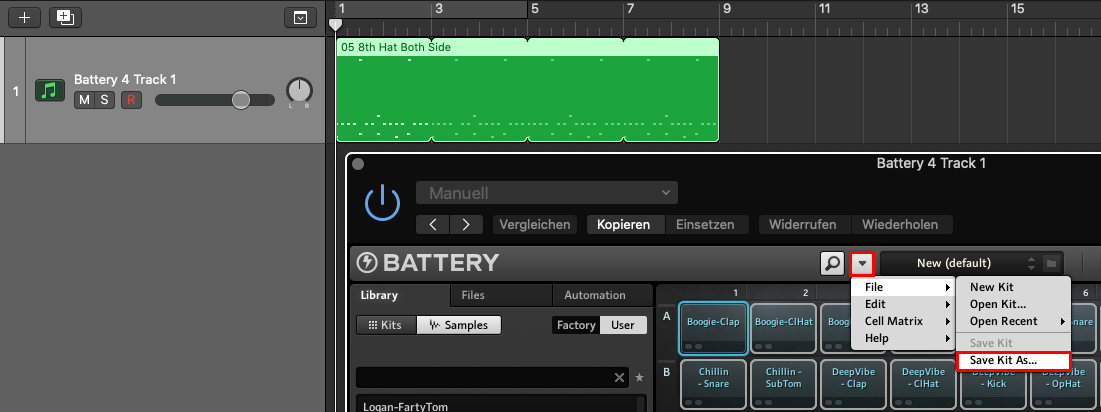
4. Please choose a Kit name that you can easily associate with the specific track, so that you can load it again later. Also make sure to enable Patch Only on the Saving Kit window.
5. Remove the Battery instance from the track - but not the whole track!
6. Load Battery again on the same track.
7. Load the saved Battery Kit again via File > Open Kit....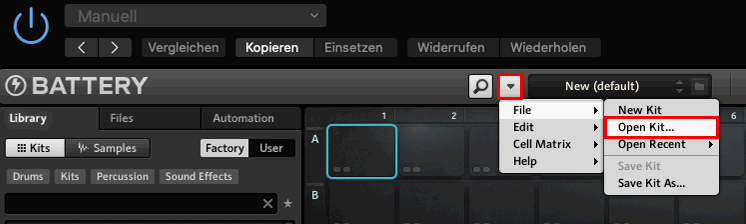
8. Save your DAW project.
Please repeat these steps for each Battery track in your DAW project.
Was this article helpful?
That’s Great!
Thank you for your feedback
Sorry! We couldn't be helpful
Thank you for your feedback
Feedback sent
We appreciate your effort and will try to fix the article