In some cases, it may be necessary to run a Windows program in administrator mode. Depending on whether you want to start the program once or always in administrator mode, follow the respective steps:
Always run a Program as an Administrator
- Start Windows File Explorer and open the program's location. Usually, this is:
C: > Program Files > *Program Name Folder* - Right-click the program file (.exe) and choose Properties.
- In the Compatibility tab, activate the option Run this program as an administrator.
- Click Apply, then OK.
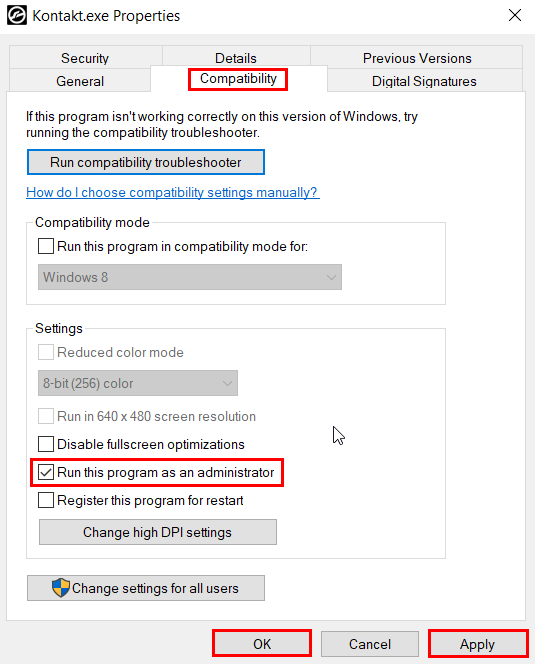
Note: Depending on your Windows Account Settings, you may receive a warning message. Click Continue to confirm the changes.
Run a Program once as an Administrator
- Start Windows File Explorer and open the program's location. Usually, this is:
C: > Program Files > *Program Name Folder* - Right-click the program file (.exe) and choose Run as administrator.
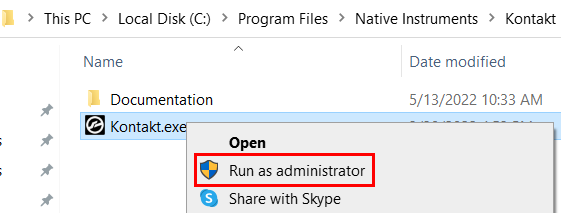
Note: Depending on your Windows Account Settings, you may receive a warning message. Click Continue to proceed.
Was this article helpful?
That’s Great!
Thank you for your feedback
Sorry! We couldn't be helpful
Thank you for your feedback
Feedback sent
We appreciate your effort and will try to fix the article