Note: In this article, we are referring to e-vouchers that are being granted after NI product registrations. The terms & conditions of other NI e-vouchers may vary.
Receiving your E-Voucher Code
Once your product has been registered, you will receive a confirmation e-mail stating that your e-voucher can now be redeemed. This email includes the e-voucher code. If you cannot find the e-mail after the registration, please also check your Spam folder. Please note that it may take up to 48 hours after registration to receive your e-voucher.
- Please register your hardware product.
- You can register your software product by installing it with Native Access.
Which products can I purchase with my E-Voucher?
Your e-voucher is valid for all Native Instruments software downloads available in the NI Online Shop. It is not valid for the following products:
- Updates, Upgrades, Crossgrades
- Hardware products
- NKS partner products
- Subscriptions
- Educational licenses
- Products that are part of a special offer
If you've tried purchasing any of the products above with your e-voucher, please choose a different product. There are a few more exceptions. Please check the full E-Voucher Terms & Conditions.
Redeeming your E-Voucher
After you add a product to your shopping cart, you can enter your e-voucher code and redeem it:
- Log in to your NI account.
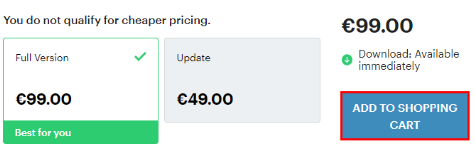
- On the product's pricing page, click ADD TO SHOPPING CART:
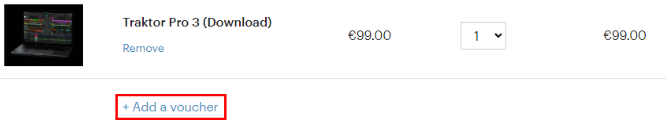
- Click Add a voucher:
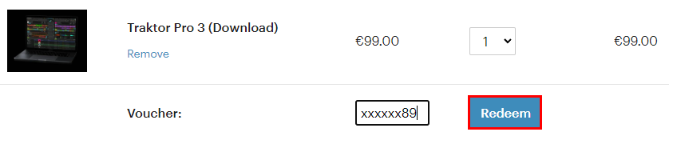
- Enter your e-voucher code and click Redeem:
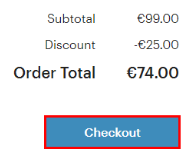
- Now the e-voucher has been added to the shopping cart and the Order Total has been reduced. Click on Checkout to proceed with your payment details.
Was this article helpful?
That’s Great!
Thank you for your feedback
Sorry! We couldn't be helpful
Thank you for your feedback
Feedback sent
We appreciate your effort and will try to fix the article