How to Enable the Audio Unit (AU) Plug-in Versions of Native Instruments Software in MASCHINE 2 (OS X)
On Mac OS X, the Manager pane in the Plug-ins section of MASCHINE 2.0's Preferences contains an additional Use NI Audio Units checkbox.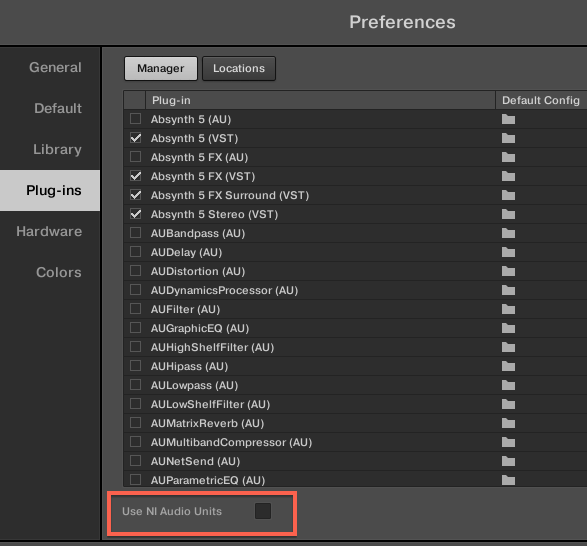
Check this box to include the Audio Units (AU) versions of your Native Instruments plug-ins in the software’s plug-in menus and in the controller’s plug-in browser: If this checkbox is disabled (default setting), the AU versions of your Native Instruments plug-ins are still listed in the list above but they are disabled (checkbox unchecked).
If you enable the Use NI Audio Units checkbox, all Native Instruments’ AU plug-ins will become available for loading in MASCHINE 2.0. In order to distinguish them from the VST versions, plug-in entries in the Native Instruments sub-menu of the plug-in menus and in the plug-in browser will display either (VST) or (AU) after their name: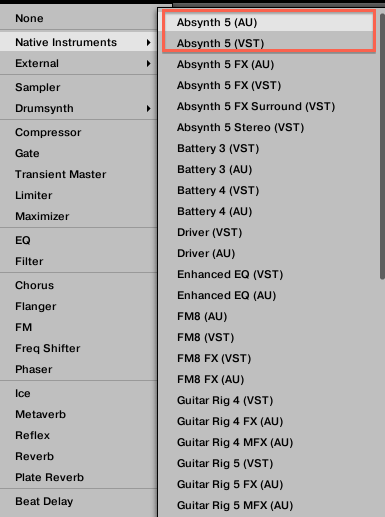
Important Note: The Use NI Audio Units checkbox relates only to AU plug-ins from Native Instruments. AU plug-ins from third-party manufacturers are not affected by this setting. When the Use NI Audio Units checkbox is disabled or the AU version of a Native Instruments plug-in is disabled, you can still load Projects that use the AU plug-in.
Was this article helpful?
That’s Great!
Thank you for your feedback
Sorry! We couldn't be helpful
Thank you for your feedback
Feedback sent
We appreciate your effort and will try to fix the article